

This is a sophisticated Windows malware campaign actively observed by Fortinet’s threat researchers. It doesn’t exploit a software vulnerability; instead, it coaxes a user into launching it by social engineering, then unfolds in multiple stages, gaining full control of the victim’s system. Once infected, the campaign:
⬥ Disables security protections (especially Microsoft Defender),
⬥ Steals sensitive data and credentials,
⬥ Takes screenshots and monitors activity,
⬥ Deploys a Remote Access Trojan (RAT),
⬥ Encrypts files via ransomware, and
⬥ Locks the machine to coerce ransom payment.
It’s important to note the entire sequence is designed to avoid detection, blend in with legitimate Windows operations, and hit the system hard before victims realize anything is wrong.
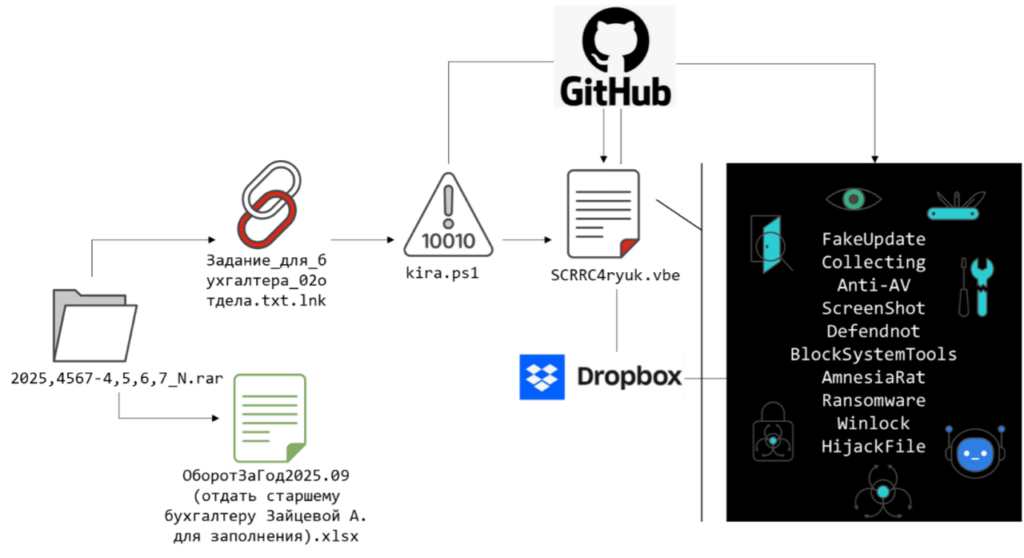
Who Is Impacted
This campaign specifically targets Microsoft Windows systems, with initial evidence showing focus on users in Russia — but these techniques can apply to Windows machines globally. The nature of the social engineering materials (translated business documents and spreadsheets) suggests an aim at corporate or business environments where opening spreadsheets and documents is common.
Because of its broad Windows targeting and use of common tools like PowerShell and cloud hosting services, any organization or individual on Windows could be at risk if proper security awareness and protections aren’t in place.
High-Level Timeline of the Attack Chain
The attack unfolds in clear stages, each designed to escalate control with stealth:
Stage 0 — Social Engineering & User Interaction
- Victims receive a compressed archive disguised as legitimate business files (for example, accounting or reporting documents).
- Inside is a Windows shortcut file (an LNK) that looks like a text file but actually launches PowerShell when clicked.
- This is not a vulnerability exploit — it works because the user is tricked into clicking the file.
This social engineering is the gateway: no zero-day, no exploit, just trust and trickery.
Stage 1 — PowerShell Loader
Once the user clicks the “document”:
- A PowerShell command runs with execution policy bypass flags (
-ExecutionPolicy Bypass) so it won’t be blocked by local PowerShell policies. - This command pulls down the first stage loader script (
kira.ps1) from a public GitHub repository. - The loader’s job is to quietly prepare the system for deeper compromise — it hides its console window, creates a decoy document to distract the user, and reports back to the attacker via Telegram Bot API that the first stage succeeded.
- After waiting a fixed time, it pulls down another obfuscated script — a VBScript — to continue the infection.
Stage 2 — Obfuscated VBScript Orchestrator
This stage:
- Loads a heavily obfuscated VBScript (encoded and encrypted so it’s unreadable on disk).
- Only in memory is the true malicious logic rebuilt and then run.
- It checks whether it has administrator privileges; if not, it attempts a privilege escalation using built-in Windows mechanisms.
- This keeps it from writing obvious files to disk that could trigger antivirus.
Stage 3 — Disabling Security & Evasion
Once running with admin rights, the malware:
- Neutralizes Windows Defender entirely:
- Turns off real-time scanning, script scanning, archive scanning, and more.
- Adds broad directories to Defender’s scan exclusions.
- Writes registry settings so Defender stays suppressed.
- Deploys a tool called Defendnot, which misuses Windows Security Center trust logic. This tricks Windows into disabling Defender under the belief a trusted antivirus exists — a stealthier bypass than just killing Defender.
This clears the way for later stages without alerting protection software.
Stage 4 — Surveillance & Reconnaissance
With defenses offline, the campaign pivots to information gathering:
- System info (host name, user context, domain membership) is gathered and sent to the attacker via Telegram Bot API.
- A dedicated screenshot-capturing component (
TelegramWorker.scr) is deployed, which silently takes repeated screenshots and transmits them. - This gives real-time visibility into the victim’s screen for about 15 minutes — enough for attackers to observe credentials, open applications, or sensitive screens.
Stage 5 — System Lockdown & Control Suppression
To prevent recovery or investigation:
- Critical admin tools like Task Manager, Registry Editor, Run dialog, and system settings get disabled via registry policies.
- Windows Recovery Environment gets turned off, and all Volume Shadow Copies are deleted — wiping backups and undo mechanisms.
- File associations (how Windows opens file types) are reconfigured so most files simply refuse to open, restricting normal operation.
The system now feels completely crippled to the user.
Stage 6 — Final Payload Deployment
This stage delivers the most damaging payloads:
Amnesia RAT (Remote Access Trojan)
- Dropped as
svchost.scr. - Offers full remote access:
- Extracts browser saved passwords, cookies, and session tokens.
- Targets messaging app sessions (like Telegram Desktop).
- Monitors clipboard for wallet seed phrases.
- Can control processes, execute commands, and exfiltrate huge amounts of data.
- Exfiltration is often done via Telegram API calls — blending with normal traffic.
Hakuna Matata Ransomware
- Runs next, encrypting hundreds of file types.
- Encrypted files get a custom extension, and the ransomware displays a ransom note demanding payment.
- It kills processes associated with database platforms, office tools, and security software before encrypting, maximizing impact.
WinLocker Component
- Independently locks the desktop environment so the victim cannot easily use the machine or access data.
- Displays a Russian-language message with ransom demand and threats if not paid promptly.
IOCs
URLs
hxxps://github[.]com/Mafin111/MafinREP111
hxxps://dl.dropboxusercontent[.]com/scl/fi/fvugw0l9x7ty665esaul3/svchost.scr?rlkey=urzegysuk9bkrw2b8zmx31457&st=gbhmc2su
LNK
7b8cf0ef390a7d6126c5e7bf835af5c5ce32c70c0d58ca4ddc9c238b2d3f059a
Scripts
1828614be6d9bdd92f7ee30e12c8aac8eba33a6df2c92995f9bf930c3f1b992b
3aa6ebb73390d304eef8fd897994906c05f3e967f8f6f6a7904c6156cf8819f9
263b5ba921e478215dc9e3a397157badab415fc775cfb4681821b7446c14fb1a
5443232a367a83ac2899b37c066dae3ec2010df292291db24ce3d744133218a6
Payloads
359fe8df31c903153667fbe93795929ad6172540b3ee7f9eff4bcc1da6d08478
6222775b877b4be4f5407525d52c5889739b96c302e5a204ef369b4a51c6dab2
71069a5d2a80a047ca36ca82e630d353829726d4f03a74c7522b7700c5c2bb59
45e942ba59f3876b263a03ed7e5d5b1b250e84a0a4b4093b3c13b5fca4e12b21
e6ca6bab85ae1eff08a59b46b7905ae0568110da172dec8367f32779094bdd08
7de56603a7b41fca9313231df6105dbb8148d3b0d80dfbc00e71e1d88f871915
MITRE ATT&CK Mapping
MITRE ATT&CK techniques observed in this campaign map to the following:
| Tactic | Technique ID | Technique Name | Observed Behavior in This Campaign |
| Initial Access | T1566.001 | Phishing: Attachment | Delivery of malicious LNK and decoy documents inside a compressed archive masquerading as business files |
| Execution | T1059.001 | Command and Scripting Interpreter: PowerShell | PowerShell executed via LNK to download and execute staged payloads |
| Execution | T1059.005 | Command and Scripting Interpreter: VBScript | Obfuscated VBScript used as an orchestration layer and loader |
| Defense Evasion | T1562.001 | Impair Defenses: Disable or Modify Tools | Systematic disabling of Microsoft Defender features via PowerShell and registry policy |
| Defense Evasion | T1562.004 | Impair Defenses: Disable or Modify System Firewall / AV | Abuse of Defendnot to disable Defender by registering a fake antivirus |
| Defense Evasion | T1027 | Obfuscated / Encrypted Files or Information | Script Encoder Plus, Base64, and RC4 used to conceal payload logic |
| Defense Evasion | T1218 | Signed Binary Proxy Execution | Injection of Defendnot into trusted Microsoft-signed process (Taskmgr.exe) |
| Privilege Escalation | T1548.002 | Abuse Elevation Control Mechanism: Bypass UAC | Repeated ShellExecute “runas” invocation to force UAC elevation |
| Persistence | T1547.001 | Boot or Logon Autostart Execution: Registry Run Keys | Autorun persistence via HKCU\Software\Microsoft\Windows\CurrentVersion\Run |
| Persistence | T1547.001 | Boot or Logon Autostart Execution: Startup Folder | Payloads copied to user Startup directory |
| Discovery | T1082 | System Information Discovery | Collection of OS, hardware, domain, and environment details |
| Discovery | T1057 | Process Discovery | Enumeration of running processes to control execution and avoid duplication |
| Collection | T1113 | Screen Capture | Periodic screenshot capture via TelegramWorker.scr |
| Collection | T1056.001 | Input Capture: Clipboard Data | Clipboard monitoring for seed phrases and cryptocurrency addresses |
| Credential Access | T1555 | Credentials from Password Stores | Extraction of browser credentials and session data using DPAPI |
| Credential Access | T1539 | Steal Web Session Cookie | Theft of browser cookies and active session tokens |
| Credential Access | T1098 | Account Manipulation | Telegram Desktop session hijacking via stolen tdata artifacts |
| Command and Control | T1102.002 | Web Service: External Web Services | Telegram Bot API used for C2 and data exfiltration |
| Command and Control | T1071.001 | Application Layer Protocol: Web Protocols | HTTPS-based communication to Telegram and file-hosting services |
| Exfiltration | T1041 | Exfiltration Over C2 Channel | Data sent directly through Telegram Bot APIs |
| Exfiltration | T1567.002 | Exfiltration Over Web Service | Use of third-party file hosting (e.g., GoFile) for large data sets |
| Impact | T1486 | Data Encrypted for Impact | Hakuna Matata–derived ransomware encrypts user files |
| Impact | T1490 | Inhibit System Recovery | Deletion of backups, shadow copies, and disabling Windows Recovery |
| Impact | T1489 | Service Stop | Termination of services and processes prior to encryption |
| Impact | T1491.001 | Defacement: Internal | Wallpaper replacement and ransom messaging |
| Impact | T1499 | Endpoint Denial of Service | WinLocker deployment and file association hijacking |
| Impact | T1565.001 | Stored Data Manipulation | Clipboard hijacking to replace cryptocurrency wallet addresses |
Overall Impact
This campaign combines credential theft, surveillance, ransomware extortion, and system denial into one chain. It’s not just data theft — it locks systems, destroys backups, and leaves victims with crippled machines. Compared to simple malware, this campaign:
- Neutralizes defense tools permanently
- Diverts user attention while infecting silently
- Harvests sensitive data and accounts
- Uses public cloud services (GitHub, Dropbox) to host payloads
- Avoids traditional detection (obfuscation + memory-only loading)
This type of attack can devastate organizations reliant on Windows systems if users are tricked into opening a malicious file.
Takeaways for Defense
Because this attack hinges on social engineering and trusted system features, prevention focuses on:
- User awareness training (don’t open unexpected archives),
- Strong PowerShell policy enforcement,
- Endpoint detection that monitors behavior (not just signatures),
- Blocking known malicious script hosts and API endpoints used for exfiltration.
