

In today’s threat landscape, not every attack starts with a vulnerability. Sometimes, it starts with a conversation. In this case, investigated by Microsoft’s Detection and Response Team (DART) in November 2025, the attacker didn’t break in—they talked their way in. This blog walks through how a simple Microsoft Teams call turned into a full compromise, what tools were used, and what we can learn from it.
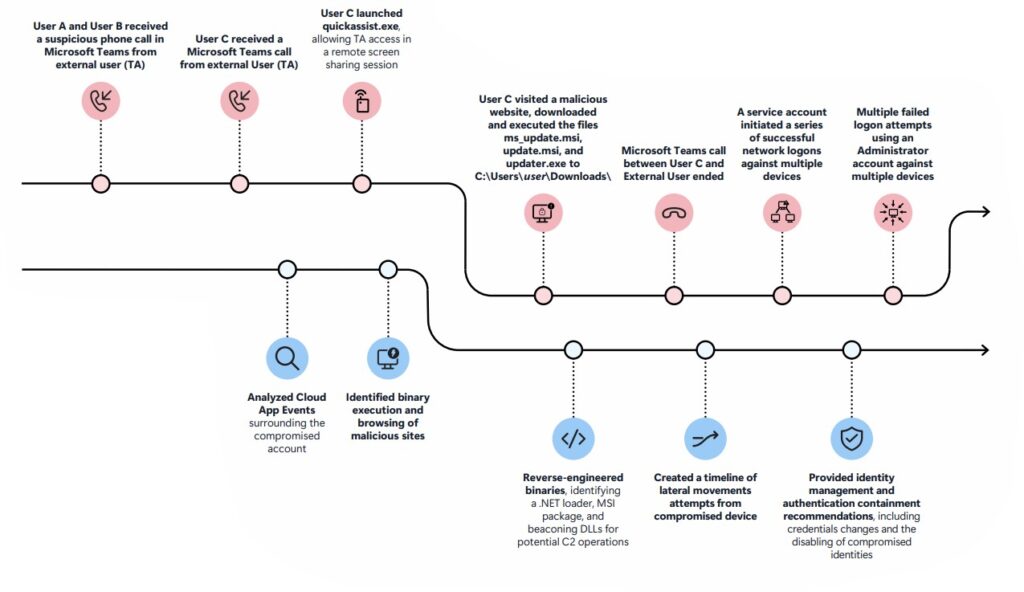
It Started with a Call
The attacker’s approach was straightforward but effective.
They used Microsoft Teams to place voice calls to employees, pretending to be IT support. This is known as voice phishing, or vishing.
- The first two attempts failed.
- On the third try, they succeeded.
The attacker convinced an employee to open Quick Assist, a legitimate Microsoft remote support tool. Once the session started, the attacker had direct access to the user’s system.
No exploit. No malware yet. Just trust.
From Remote Access to Credential Theft
Once inside, the attacker guided the user to a fake website. From forensic analysis, it was clear what happened next:
- The user entered their corporate credentials into a spoofed login page
- This triggered downloads of malicious files onto the system
At this point, the attacker had both:
- Valid credentials
- An active session on the device
That combination is powerful.
What Got Installed Behind the Scenes
After gaining access, the attacker deployed several layers of malware. Each one had a specific role.
1. A Fake Installer (update.msi)
This file looked harmless but wasn’t.
- It installed files into the
%AppData%\Pdf24\folder - It used a trick called DLL side-loading
- A signed file (
cryptbase.dll) was abused to execute malicious code
2. A Loader Disguised as updater.exe
Next came updater.exe, which acted as a delivery system.
DART’s analysis showed that it:
- Dropped a signed and encrypted .NET loader
- Installed a hidden agent on the machine
This agent could:
- Communicate with attacker servers over encrypted channels
- Run commands using Command Prompt or PowerShell
- Route traffic using a SOCKS5 proxy
In simple terms, the attacker now had remote control.
3. Credential Stealer + RAT
Two more components made the situation worse:
artek32.dll
- Written in Rust
- Linked to the RustyStealer family
- Steals browser sessions and credentials
cryptbase.dll (malicious version)
- Acts as a Remote Access Trojan (RAT)
- Connects back to attacker-controlled infrastructure
Together, these tools gave the attacker:
- Access to sensitive data
- Persistent control
- A way to operate quietly
DART Steps In
Because there was a risk to Active Directory, DART moved quickly.
Here’s what they found:
- The attack was limited in time
- Only Tier 2 devices were affected
- No widespread lateral movement occurred
They focused on key artifacts like:
quickassist.exeupdate.msiupdater.exe
Containment and Cleanup
DART took immediate action:
- Kicked the attacker out of the environment
- Locked down Active Directory
- Prevented lateral movement
- Protected privileged accounts
Using internal tools like Fennec, FoX, and COSMIC, they:
- Collected forensic evidence
- Scanned systems
- Verified no persistence remained
Good news:
The attack was contained before it could escalate further.
Why This Attack Worked
This wasn’t about exploiting software. It was about exploiting people.
Vishing works because:
- Employees want to help
- The request feels urgent and legitimate
- The tools being used (like Teams and Quick Assist) are trusted
The attacker didn’t need to hack the system—they just needed someone to open the door.
How to Defend Against This
There are some practical steps organizations can take.
1. Lock Down External Teams Access
- Block unknown or unmanaged accounts
- Only allow trusted organizations to connect
2. Use Allowlists for Communication
- Define which external domains are allowed
- Restrict both incoming and outgoing communication
3. Control Remote Access Tools
- Keep a list of approved tools
- Remove unused ones
- Disable tools like Quick Assist if not needed
Final Thoughts
This incident is a reminder of how modern attacks are changing. Attackers are no longer just looking for vulnerabilities in code. They’re looking for vulnerabilities in behavior. They blend in. They use real tools. They sound convincing. And often, that’s enough. In this case, a fast response made all the difference. The attack was contained, the scope was limited, and no further damage was done. But the bigger lesson is clear:
Security isn’t just about systems anymore—it’s about people, processes, and trust.
