

The CTRL toolkit is a newly identified remote access framework built using the .NET ecosystem and operated by a likely Russian-speaking threat actor. What makes this toolkit stand out is its careful design for stealth, persistence, and hands-on keyboard control, rather than noisy automated attacks. It combines credential harvesting, reverse proxy tunneling, and deep system access into a single modular toolkit.
Unlike commodity malware, CTRL has not been previously documented in public threat intelligence feeds. Its discovery originated from exposed infrastructure found during open directory scanning, revealing a well-structured and actively maintained attack framework.

Background and Discovery
The investigation began when an exposed directory was identified through open-source scanning techniques. A malicious LNK file pointed toward a payload hosted on:
- hui228[.]ru
- Associated IPs:
- 194.33.61[.]36
- 109.107.168[.]18
The infrastructure runs on Partner Hosting LTD (AS215826), a relatively new ASN established in early 2025, with servers located in Frankfurt.
Interestingly, the domain uses FreeDNS (afraid.org) — a free dynamic DNS provider often chosen by threat actors to avoid identity tracking through domain registrars.
The payload repository itself contained three .NET binaries forming the core of the CTRL toolkit.
Initial Access: LNK-Based Social Engineering
The infection starts with a deceptively simple file:
Private Key #kfxm7p9q_yek.lnk
This shortcut file is designed to look like a harmless folder by using a standard Windows directory icon. When opened, it silently executes PowerShell in the background.
Key characteristics:
- No visible window (hidden execution)
- Encoded payload inside command-line arguments
- Metadata timestamps wiped
- Internal label: “Polycue”
The entire malicious chain is embedded directly inside the LNK file, meaning no immediate external download is required.
Multi-Stage Attack Chain
The CTRL toolkit uses a layered execution flow designed to evade detection and complicate analysis.
Stage 1: PowerShell Loader
The LNK triggers a PowerShell script that:
- Decodes multiple layers of base64 content
- Cleans the Startup folder to remove competing persistence
- Decompresses a hidden .NET payload
- Stores it in the Windows Registry
Registry location:
HKCU\SOFTWARE\Microsoft\Windows\CurrentVersion\Explorer\
The payload never exists as a file on disk — it lives entirely in memory and registry storage.
Stage 2: .NET Stager (StandaloneProgram)
This component acts as the orchestrator.
It performs:
- Privilege escalation via fodhelper.exe UAC bypass
- VPN disconnection if connectivity fails
- Payload downloads from: hui228[.]ru:82/hosted/
- Registry migration from HKCU → HKLM
- Scheduled task persistence
It also deploys:
- ctrl.exe
- FRPWrapper.exe
- RDPWrapper.exe
Stage 3: Persistence and System Modification
Persistence mechanisms include:
- Scheduled tasks:
- DriverSvcTask
- NetTcpSvc
- TermSvcHost
- WindowsHealthMonitor
- Registry-stored payloads:
- ShellStateVersion1
- IconSizeVersion1
- IconUnderlineVersion1
- Hidden admin accounts:
- Username: Administrator / Admin / Windows
- Password: ADAD
Core Capabilities
1. Credential Harvesting (Windows Hello Spoofing)
One of the most advanced features is a fake Windows Hello interface.
It:
- Mimics real Windows UI using WPF
- Displays:
- User’s real name
- Profile picture
- System theme (dark/light)
- Blocks escape keys:
- Alt+Tab
- Alt+F4
- Windows key
Most importantly:
Captured PINs are validated against the real Windows authentication system before being accepted.
Captured credentials are logged as:
[STEALUSER PIN CAPTURED]
2. Keylogging
- Stored at: C:\Temp\keylog.txt
- Tracks:
- Window titles
- Keystrokes with timestamps
- Smart logging:
- Removes backspaces instead of recording them
3. Remote Desktop Access
The toolkit:
- Patches termsrv.dll
- Installs RDP Wrapper
- Enables unlimited concurrent sessions
Registry changes include:
fDenyTSConnections = 0
MaxInstanceCount = 99999
4. Reverse Proxy via FRP
The malware uses FRP (Fast Reverse Proxy) for communication.
Configuration:
serverAddr = hui228.ru
serverPort = 7000
auth.token = ADAD
Proxies:
- RDP (port 3389)
- TCP shell (port 5267)
This allows attackers to control the system without exposing a traditional C2 channel.
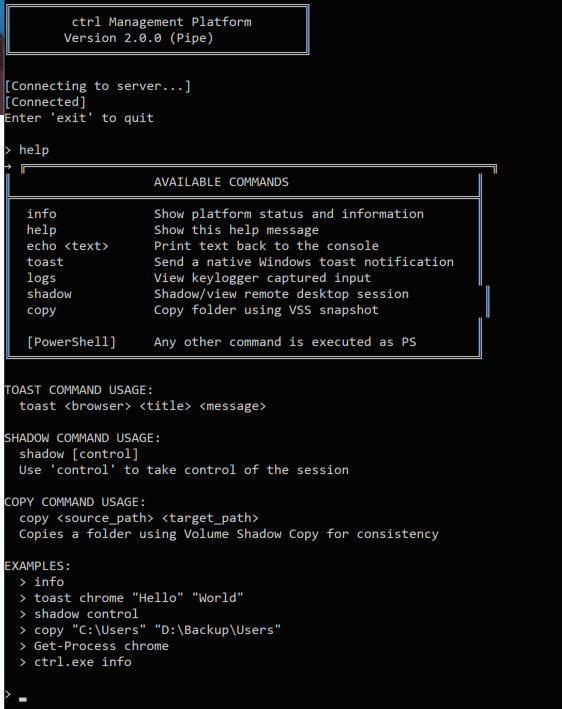
5. ctrl.exe – Command Platform
This is the operator’s main interface.
It works via a named pipe (ctrlPipe) and supports:
Commands include:
info– system detailslogs– retrieve keylogsshadow– hijack user sessioncopy– file exfiltration via shadow copytoast– fake browser notificationsstealuser– launch phishing window
Any unknown command is passed directly to PowerShell.
6. FRPWrapper.exe
This component:
- Decrypts a Go-based FRP binary
- Loads it entirely in memory using manual PE mapping
- Executes reverse proxy tunnel
Russian debug strings confirm origin:
"Не найдена функция GoMain"
7. RDPWrapper.exe
Automates:
- DLL patching
- Defender exclusions
- Registry configuration
Enables unrestricted RDP access without user awareness.
Indicators of Compromise (IOCs)
Network
- hui228[.]ru
- 194.33.61[.]36
- 109.107.168[.]18
- Port 7000 (FRP)
- Port 82 (payload hosting)
- Port 5267 (TCP shell)
Host
- Registry: HKLM\SOFTWARE\Microsoft\Windows\CurrentVersion\Explorer\
- Files: C:\ProgramData\SystemTools\ctrl.exe
C:\ProgramData\frp\frpc.toml
C:\Temp\keylog.txt - Named pipe: ctrlPipe
Authentication
- FRP token: ADAD
- Hidden account password: ADAD
Operational Security (OPSEC) Observations
CTRL is carefully engineered to minimize detection:
- No hardcoded C2 inside binaries
- Infrastructure only revealed at runtime
- All activity routed through RDP sessions
- No beaconing patterns
This design makes traditional detection techniques far less effective.
Our Analysis and Opinion
The CTRL toolkit represents a shift away from traditional mass malware campaigns toward highly controlled, operator-driven intrusions. Instead of relying on noisy communication channels or automated exploitation, this framework focuses on persistence, stealth, and direct human interaction with compromised systems.
What stands out most is the intentional avoidance of conventional command-and-control infrastructure. By leveraging FRP tunnels and RDP sessions, the attacker effectively blends malicious activity with legitimate administrative behavior. This creates a major challenge for defenders, as distinguishing between real administrative access and malicious control becomes significantly harder.
The Windows Hello phishing mechanism is particularly concerning. It goes beyond simple credential harvesting and introduces validation against the real authentication system. This ensures attackers only collect working credentials, dramatically increasing the success rate of lateral movement and privilege escalation. From a defensive standpoint, this removes one of the traditional advantages — invalid or mistyped credentials — that often help detect phishing attempts.
Another notable aspect is the registry-based payload storage. By avoiding disk artifacts and operating largely in memory, CTRL reduces its forensic footprint. Combined with falsified PE timestamps and layered obfuscation, the toolkit demonstrates a clear understanding of modern detection capabilities and how to evade them.
However, despite its sophistication, there are operational weaknesses. The reuse of static credentials such as “ADAD,” unpatched SSH vulnerabilities on the hosting server, and reliance on exposed infrastructure suggest that while the developer is technically skilled, operational discipline is not perfect. These gaps could provide defenders with opportunities for detection and attribution.
In our view, CTRL is not designed for broad campaigns but rather targeted operations against individuals or small groups. Its design supports long-term access, credential harvesting, and manual exploitation rather than rapid spread. This aligns more closely with cybercriminal operations or small threat groups than with large-scale nation-state campaigns.
Overall, CTRL highlights an important trend in modern threats: fewer automated attacks and more human-driven intrusions. Organizations must adapt by improving behavioral monitoring, securing RDP access, and implementing stronger identity protection mechanisms, especially around Windows Hello and local authentication workflows.
Conclusion
CTRL is a highly capable and stealth-oriented toolkit built for persistence and direct control. Its modular design, advanced phishing techniques, and reliance on legitimate system features make it particularly dangerous.
Detection requires:
- Behavioral monitoring
- Registry inspection
- RDP usage analysis
- Network anomaly detection
This case reinforces a critical reality in cybersecurity: the most effective threats are no longer the loudest ones, but the quiet, persistent ones that blend into normal system activity.
