

Phishing on LinkedIn isn’t new. Fake recruiters, shady job offers, and suspicious DMs have been around for years. What is new is how attackers are now abusing the comment system itself—and it’s clever enough that even experienced users are getting caught.
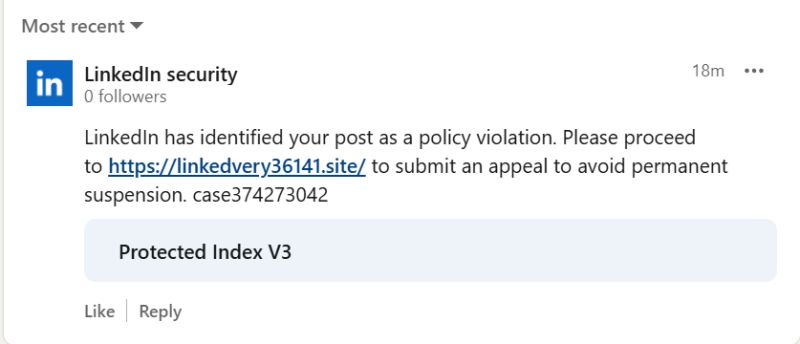
Instead of sending private messages, attackers are leaving public replies in comment sections that look like official LinkedIn system messages. These comments claim your account has violated LinkedIn policies or is at risk of restriction and urge you to “verify” or “appeal” immediately.
At a glance, they look legitimate. That’s the problem.
How the Attack Works
The scam starts when you comment on, like, or interact with a post—often something visible and high-traffic. Shortly after, a reply appears under your comment. It may use LinkedIn-style language, security-themed wording, and even branding cues. Some are posted by fake company pages with names that resemble LinkedIn or sound “official.”
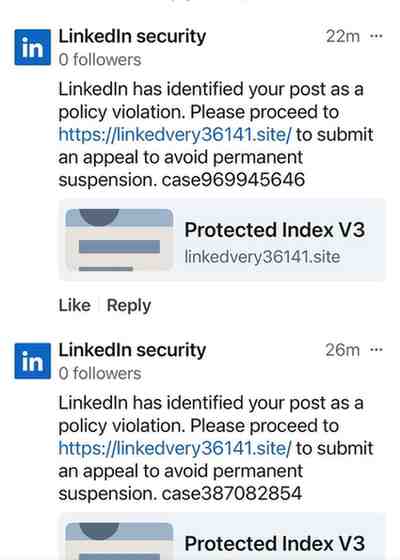
The comment typically says something like:
- “Your account has been flagged for violating LinkedIn policies.”
- “Immediate action required to avoid account restriction.”
- “Verify your identity to restore full access.”
A link is included, sometimes shortened using LinkedIn’s own lnkd.in shortener. That detail alone makes many people drop their guard.
Clicking the link takes you to a phishing page designed to steal your credentials. In some cases, there are multiple redirect steps to make the page look more authentic. Once credentials are entered, attackers can take over the account, lock out the user, and use the compromised profile to scam others.
Why This Is So Effective
This tactic works because it breaks expectations.
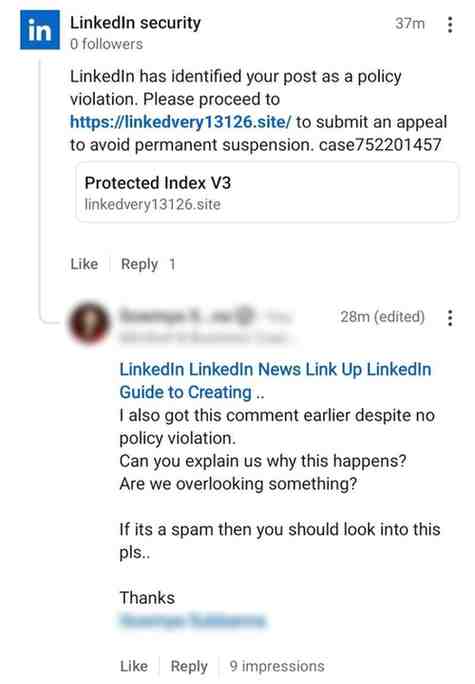
Most people know to be cautious with DMs. We’re trained to distrust cold messages and unsolicited links. Public comments, however, feel safer. They’re visible to everyone. They feel moderated. They don’t trigger the same internal alarm bells.
There’s also a psychological trick at play: comments feel platform-generated. When something appears directly inside LinkedIn’s interface—especially beneath your own comment—it’s easy to assume it’s an automated system message rather than a scam.
Add urgency (“your account may be restricted”), fear (loss of access), and familiarity (LinkedIn branding and shortened links), and you get a highly convincing phishing setup.
What Makes These Comments Suspicious
Despite how real they look, there are clear red flags once you know what to check.
First, LinkedIn does not communicate policy violations through public comments. Ever. Real enforcement notices appear through in-app notifications or emails from official LinkedIn domains.
Second, the commenting accounts are often newly created, have little activity, or represent fake company pages rather than verified LinkedIn profiles.
Third, any comment—public or private—asking you to log in through a link should be treated as hostile by default.
Why This Matters Beyond Individual Users
Once attackers control a LinkedIn account, they don’t just steal data—they weaponize trust. Compromised profiles are used to send believable phishing messages, post malicious links, and target coworkers, clients, and business partners.
For companies, this turns LinkedIn into a supply-chain attack surface. One stolen account can lead to many more.
How to Protect Yourself
The simplest rule: never click account-security links in comments.
If you’re worried about your account status, open LinkedIn directly, go to settings, and check notifications there. Don’t use links—type the site yourself.
Also:
- Enable two-factor authentication
- Review active sessions regularly
- Report and delete suspicious comments so others don’t fall for them
The Bottom Line
This phishing campaign succeeds because it blends perfectly into normal LinkedIn behavior. It doesn’t shout. It doesn’t spam. It waits for you to engage—and then quietly takes advantage of your trust.
