

What Is MFA Fatigue (Push Bombing)?
MFA Fatigue, also known as Push Bombing, is a cyberattack where attackers overwhelm a user with repeated multi-factor authentication (MFA) approval requests until the user finally clicks “Approve”, even though they did not initiate any login.
The attacker does not break the MFA system.
Instead, they exploit human behavior — frustration, confusion, and exhaustion.
In simple terms:
The attacker keeps asking for permission until the victim gets tired and says yes.
Why MFA Exists and How This Attack Bypasses It
MFA is meant to protect accounts by requiring something extra beyond a password, usually a phone notification or code.
Normal Login
- User enters username and password
- MFA request is sent
- User approves
- Access is granted
MFA Fatigue Attack Flow
- Attacker already has the user’s password
- Attacker repeatedly attempts to log in
- Each attempt triggers an MFA push notification
- Victim receives dozens of prompts
- Victim eventually approves one
- Attacker gains full access
The system works correctly.
The mistake happens at the human level.
How Attackers Get Started
Before MFA fatigue can happen, attackers usually obtain the victim’s password through:
- Phishing emails or fake login pages
- Password reuse from older data breaches
- Malware or keylogging
- Guessing weak passwords
- Buying stolen credentials
Once the password is known, the attacker relies on push notifications to do the rest.
Why MFA Fatigue Works So Well
This attack succeeds because of normal human reactions:
- Repeated alerts cause irritation
- Users assume it’s a system glitch
- Some believe IT triggered the request
- People approve requests quickly without reading
- Fatigue reduces judgment
This is not carelessness — it’s predictable human behavior under pressure.
Who Is Commonly Targeted
Attackers usually target users who have valuable access, such as:
- Employees at large organizations
- IT administrators
- Finance and HR staff
- Executives
- Remote workers
- VPN and cloud service users
Admin accounts are especially valuable because one approval can unlock entire systems.
What Happens After the Account Is Compromised
Once access is granted, attackers may:
- Read emails and internal messages
- Access cloud services and VPNs
- Reset passwords of other users
- Register their own MFA device
- Move to other systems inside the network
- Steal sensitive data
- Deploy ransomware
Many serious breaches begin with just one approved MFA prompt.
Warning Signs of an MFA Fatigue Attack
Common red flags include:
- MFA prompts when you are not logging in
- Multiple prompts in a short time
- Requests late at night or at odd hours
- Repeated prompts even after denial
- Login alerts from unfamiliar locations
These should never be ignored.
Why Push-Based MFA Alone Is Risky
Push-based MFA relies heavily on the user making the correct decision every time.
Attackers exploit this by applying pressure through repetition.
MFA itself is still important — but push-only MFA without safeguards is vulnerable.
MITRE ATT&CK Mapping for MFA Fatigue
The MITRE ATT&CK framework maps attacker behavior across different stages.
MFA Fatigue spans multiple tactics rather than being a single technique.
MITRE ATT&CK Mapping Table
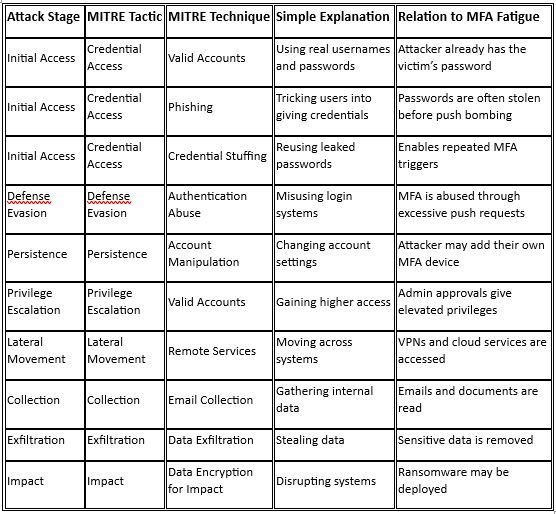
MITRE treats MFA Fatigue as abuse of valid authentication, not a technical exploit.
Real-World Example (Single Case)
What Happened
In a large organization, an employee’s password was compromised through earlier credential exposure.
The attacker repeatedly attempted to log in, triggering dozens of MFA push notifications on the employee’s phone.
Eventually, the employee approved one request simply to stop the notifications.
What Happened Next
- The attacker gained internal system access
- Administrative tools were reached
- Sensitive internal information became visible
- The incident required full security investigation
Why the Attack Succeeded
- Push-based MFA without number matching
- Repeated notifications created frustration
- Human fatigue led to one mistaken approval
How Individuals Should Protect Themselves
- Never approve an MFA request you did not initiate
- Always deny unexpected MFA prompts
- Report repeated MFA requests immediately
- Change your password if this happens
- Treat MFA alerts as security warnings, not annoyances
Rule to remember:
No login attempt means no approval.
How Organizations Can Prevent MFA Fatigue
Effective protections include:
- Number matching instead of simple approve/deny
- Limiting the number of MFA attempts
- Showing login details like location and device
- Using stronger MFA such as hardware keys or passkeys
- Training users to recognize and report MFA abuse
Simple Analogy
Imagine someone keeps ringing your doorbell all night.
You didn’t invite anyone.
Eventually, you open the door just to stop the noise.
That’s MFA Fatigue.
Final Takeaway
- MFA Fatigue targets human behavior, not software flaws
- Push notifications are the weak point
- One approval can lead to full compromise
- Awareness and better MFA design stop this attack
