

1. What Is Browser Extension Abuse?
Browser Extension Abuse happens when a browser add-on (extension) is used to spy on users, steal information, or hijack accounts.
The extension:
- Looks useful
- Often works as promised
- Is installed by the user willingly
But behind the scenes, it does things the user never agreed to.
- The danger is not how the extension is installed
- The danger is what it is allowed to see and do
2. Why Browser Extensions Are So Powerful (and Risky)
Browser extensions can:
- See every website you visit
- Read everything you type
- Capture usernames and passwords
- Steal login sessions (cookies)
- Modify web pages
- Redirect traffic silently
In simple terms:
An extension can see everything your browser sees.
3. Why Attackers Love Browser Extension Abuse
Attackers prefer extensions because:
- They don’t look like malware
- They are trusted by the browser
- Antivirus rarely flags them
- They survive reboots
- They run quietly for months
- They bypass MFA using session theft
If an attacker controls your browser,
they control your online life.
4. How Browser Extension Abuse Starts
Most abuse begins when a user:
- Installs a “free” productivity tool
- Installs a PDF converter or screenshot tool
- Installs a fake ad blocker
- Installs a “security” or “privacy” extension
- Installs an extension suggested by a website
- Installs an extension after a pop-up warning
- Installs an extension that used to be safe but was later updated maliciously
Most users don’t read permissions.
They just click Add Extension.
5. Common Types of Malicious or Abused Extensions
Fake Productivity Extensions
Examples:
- PDF converters
- Note-taking tools
- Screenshot tools
- Video downloaders
They work — but also spy.
Fake Security or Privacy Extensions
Examples:
- “Security Scanner”
- “Malware Protection”
- “Privacy Guard”
Ironically, these often steal the most data.
Browser Hijacker Extensions
These:
- Change your homepage
- Redirect search results
- Inject ads
- Track browsing behavior
Takeover of Legitimate Extensions
Sometimes:
- An extension becomes popular
- The developer sells it
- New owner adds malicious code in an update
Users trust it because it was safe before.
6. Understanding Extension Permissions (Very Important)
When an extension asks for:
“Read and change all data on websites you visit”
It means it can:
- Read login pages
- Capture passwords
- Steal session cookies
- Modify what you see
- Inject fake forms
- Monitor internal company tools
Most users don’t realize this means full control.
7. What Happens After a Malicious Extension Is Installed
Once installed, a malicious extension can:
- Log keystrokes
- Capture saved passwords
- Steal browser cookies
- Hijack logged-in sessions
- Inject fake login pop-ups
- Monitor internal dashboards
- Exfiltrate data quietly
No alerts.
a-start=”3549″ data-end=”3552″ />>No visible warning.
8. Real-World Example Scenarios
Example 1: Session Hijacking
User installs:
“Free Screenshot Tool”
Behind the scenes:
- Extension steals login cookies
- Attacker logs into email, cloud apps, portals
- No password or MFA required
User never notices.
Example 2: Credential Theft
Extension watches login pages:
- Copies usernames and passwords
- Sends them out silently
Even strong passwords and MFA don’t help.
Example 3: Fake Login Injection
Extension modifies a page:
- Adds a fake login box
- User re-enters password
- Attacker steals it
- Page reloads normally
User assumes it was a glitch.
Example 4: Corporate Access via One User
Employee installs extension at home.
Extension:
- Watches company portals
- Steals internal session tokens
- Exposes company systems
One extension → company breach.
9. Why Antivirus Usually Misses This
Antivirus struggles because:
- Extensions are not EXE files
- Browsers trust extension code
- Behavior looks normal
- No exploit is used
- Data theft is quiet
- Everything happens inside the browser
The browser becomes the attack surface.
10. Warning Signs Something Is Wrong
- Browser feels slow
- Unexpected redirects
- Ads on normal sites
- Login pages look different
- Random logouts
- MFA alerts without login attempts
- Accounts compromised without clicking links
11. What Users Should Do (Simple Rules)
For Everyone
- Install only necessary extensions
- Remove unused ones
- Read permissions carefully
- Avoid “free” tools
- Never install extensions from pop-ups
- Report strange browser behavior
For Work Devices
- Use only approved extensions
- Never install personal extensions
- Ask IT before installing
- Follow company policies
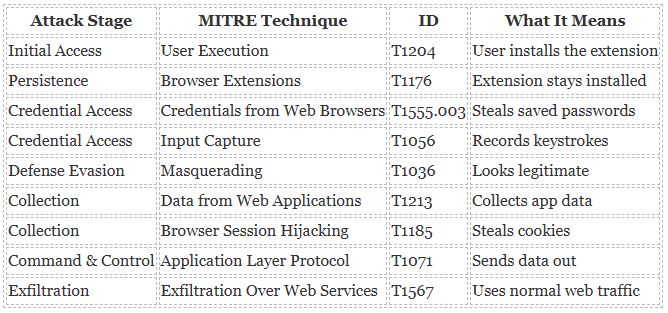
12. MITRE ATT&CK Mapping – Browser Extension Abuse
13. Browser Extension Abuse – Quick Cheat Sheet
What Is It?
A browser add-on secretly spying or stealing data.
Where It Comes From
- Browser stores
- Pop-ups
- Free tools
- Fake security tools
- Website recommendations
Red Flags
- Too many permissions
- “Read all website data”
- Sudden redirects
- Ads everywhere
- Login issues
What Can Go Wrong
- Password theft
- Session hijacking
- Account takeover
- Company breach
What To Do
- Install only what you need
- Remove unused extensions
- Use approved extensions
- Report suspicious behavior
One Rule to Remember
If an extension asks for more access than it needs — don’t install it.
14. Final Takeaway
Browser extensions are not harmless add-ons. They run inside your browser, where all your data lives.
- If you control extensions, you control security.
Awareness is the strongest defense.
