

What is QR Code Phishing (Quishing)?
Quishing is a form of phishing attack where criminals use QR codes instead of normal links or emails to trick people into giving away sensitive information.
A QR code might look harmless, but once you scan it, it can:
- Open a fake website
- Ask you to log in
- Install malware
- Steal your passwords, bank details, or personal data
The danger is that you cannot see the link behind a QR code before scanning it, which makes it easier for attackers to hide malicious websites.
Why Is Quishing So Effective?
Quishing works well because it:
- Bypasses email security filters
- Looks modern and trustworthy
- Exploits curiosity and urgency
- Targets mobile users (phones have fewer security warnings)
Many people think:
“It’s just a QR code — it must be safe.”
Attackers take advantage of this false sense of security.
How a Typical Quishing Attack Works (Step by Step)
-
Attacker creates a malicious QR code
-
- The QR code points to a fake website or malicious download.
-
QR code is distributed
-
- Printed on posters
- Stuck over real QR codes
- Sent via email, SMS, or WhatsApp
- Placed in public areas (parking meters, cafes, offices)
-
Victim scans the QR code
-
- Using their phone camera or QR scanner
-
Victim is redirected
-
- Fake login page
- Fake payment page
- Malware download page
-
Data is stolen
-
- Username & password
- Credit card details
- Corporate credentials
- Personal identity data
Common Places Where Quishing Happens
- Restaurant menus
- Parking payment machines
- Office buildings
- Public transport posters
- Utility bills
- Bank or HR emails
- Event flyers
- Delivery notices
Real-World Quishing Examples
Example 1: Fake Parking Fine
You see a QR code on your car:
“Scan here to pay your parking fine immediately.”
You scan it → fake government site → enter card details → money stolen.
Example 2: Corporate HR Scam
Employee receives an email:
“Scan the QR code to update your payroll details.”
QR code opens a fake Microsoft login page → company credentials stolen.
Example 3: Restaurant Menu Attack
Attacker pastes a fake QR sticker over a real menu QR.
Customer scans → malware is downloaded silently → phone compromised.
Example 4: MFA Bypass Attack
QR code opens a fake Microsoft or Google login page.
Victim enters credentials + MFA code.
Attacker logs in in real time and bypasses MFA.
What Kind of Data Do Attackers Steal?
- Email usernames & passwords
- Bank and credit card details
- Corporate VPN credentials
- Personal identity information
- Phone access (via malware)
- Session cookies (advanced attacks)
How Quishing Fits into MITRE ATT&CK Framework
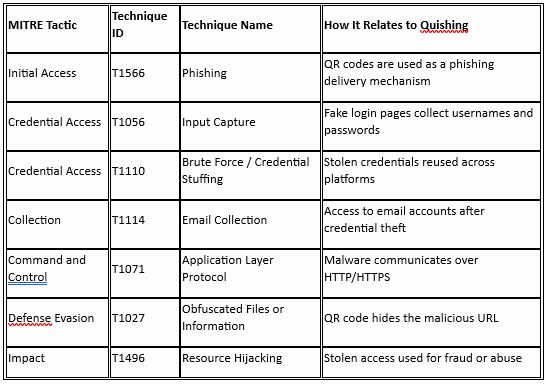
Why QR Codes Are Hard to Detect
- No visible URL
- Mobile browsers show fewer warnings
- Antivirus rarely scans QR codes
- Users trust printed material
- QR codes bypass many security tools
Signs a QR Code Might Be Malicious
- QR code asks for login details
- QR code asks for urgent payment
- QR code is placed as a sticker (can be tampered with)
- Website looks slightly off (typos, strange domain)
- No HTTPS or strange URL name
- Unexpected QR code in emails
How to Prevent QR Code Phishing (For Individuals)
1. Don’t Trust Random QR Codes
If you didn’t expect it, don’t scan it.
2. Preview the Link
Most phones show the URL before opening — read it carefully.
3. Never Enter Passwords After Scanning
No legitimate service asks for passwords via QR scans.
4. Use Mobile Security Apps
Mobile antivirus can block malicious websites.
5. Be Extra Careful in Public Places
QR codes in public can be easily replaced.
How Organizations Can Prevent Quishing
1. Security Awareness Training
Teach employees:
- QR codes can be phishing
- How to verify QR links
- When to report suspicious scans
2. Mobile Device Management (MDM)
- Restrict unknown app installs
- Block malicious URLs
3. Conditional Access Policies
-
Require extra verification for QR-based logins
4. URL Filtering & DNS Protection
-
Block known phishing domains
5. Zero Trust Approach
-
Never trust just because a QR code exists
Best Practices for Businesses Using QR Codes Legitimately
- Use branded domains
- Print QR codes securely
- Regularly inspect physical QR placements
- Add text explaining what the QR code does
- Avoid QR codes for sensitive actions (login, payments)
Key Takeaway (In Simple Words)
A QR code is just a hidden link.
If you wouldn’t click a suspicious link, don’t scan a suspicious QR code.
Quishing is dangerous not because it’s complex, but because people trust it too easily.
