

Checking your email is part of everyday life. You scroll through messages, clear spam, maybe respond to a few work updates. Then suddenly, a notification appears that looks like it’s from LinkedIn. It mentions a new message and hints at a possible opportunity. It feels routine, even exciting. Naturally, you click.
This is the reality of modern phishing attacks. They no longer rely on obvious mistakes or poorly written emails. Instead, they blend seamlessly into your daily digital routine. The danger lies in how normal everything looks.
Security researchers at the Cofense Phishing Defense Center (PDC) recently uncovered a campaign that perfectly demonstrates this shift. The attackers are sending emails disguised as LinkedIn message notifications. The goal is simple: trick users into logging in through a fake page and capture their credentials.
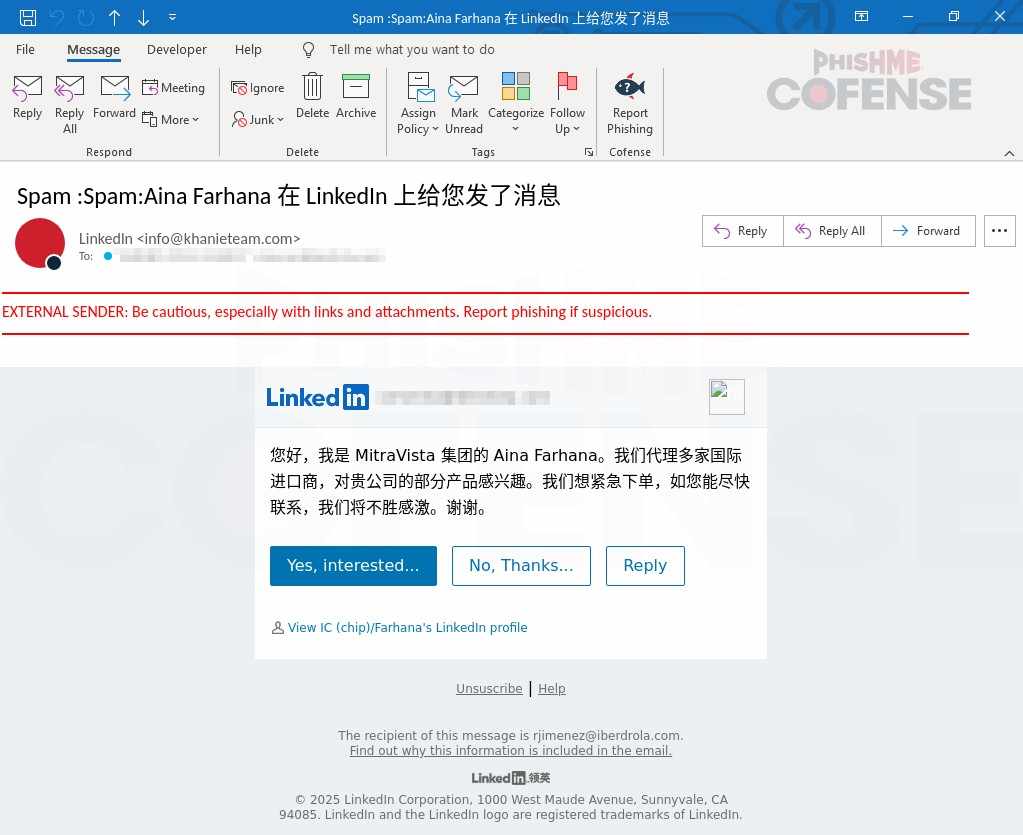
At first glance, the email is highly convincing. The design closely mirrors LinkedIn’s official notifications. Fonts, colors, and layout are carefully replicated. Even the subject line follows LinkedIn’s usual format, making it feel familiar. The sender name appears legitimate, further lowering suspicion.
Inside the email, the attacker introduces themselves as someone from a reputable company. They mention a business-related opportunity and encourage the recipient to respond quickly. This is a classic social engineering move. By creating urgency and appealing to curiosity or ambition, the attacker increases the chances of user interaction.
The email contains three buttons that seem to allow you to view or respond to the message. However, none of them lead to LinkedIn. Instead, they redirect the user to a malicious website designed to steal login credentials.
There are subtle warning signs, though. The sender’s domain, “khanieteam[.]com,” is not connected to LinkedIn. Further investigation shows that this domain was only recently created, which is often a strong indicator of malicious activity.
Once a user clicks any of the buttons, they are taken to a fake LinkedIn login page. This page is a near-perfect copy of the real one. Every detail is carefully recreated to avoid raising suspicion. To an untrained eye, it looks completely genuine.
However, the URL tells a different story. The domain “inedin[.]digital” is not owned by LinkedIn. It was registered only a couple of months before being used in this campaign. The attackers intentionally chose a name that resembles “LinkedIn,” using similar letter patterns like “in” and “din” to trick users who don’t examine URLs closely.
This technique is highly effective. Most users rely on visual familiarity rather than technical verification. If the page looks right, they assume it is safe.
Once credentials are entered, they are immediately captured by the attackers. From there, the compromised account can be used for further phishing, data theft, or even corporate espionage.
This case highlights a critical reality: phishing attacks are becoming more refined and harder to detect. Even emails that appear routine or harmless can be part of a sophisticated attack chain. Blind trust in familiar formats is exactly what attackers rely on.
The best defense is awareness. Always verify the sender’s domain. Hover over links before clicking. Double-check URLs before entering credentials. A few extra seconds of caution can prevent serious consequences.
Indicators of Compromise (IOCs)
Stage 1 – Observed Email Infection URL:
hXXps://notifcation[.]inedin[.]digital/?xgsrdh=12602024008489914930&provider=4__cmppbWVuZXpAaWJlcmRyb2xhLmNvbQ==__xvpji__lkkd
Infection URL IP(s):
104.21.80.1
104.21.64.1
104.21.112.1
104.21.48.1
104.21.16.1
104.21.32.1
104.21.96.1
Stage 2 – Observed Payload URL(s):
hXXps://singletoncop[.]info/webxr[.]php
Payload IP(s):
192.99.81.100
Our Take on This Campaign
What stands out in this case is not just the technical setup, but how well the attackers understand human behavior. This is no longer about crude phishing emails filled with spelling errors. This is about precision, timing, and psychological manipulation.
The attackers are exploiting trust in platforms like LinkedIn, which are widely used for professional communication. By mimicking a familiar workflow—receiving a message notification—they remove friction and hesitation. People are used to clicking these emails daily, which makes the attack incredibly effective.
Another important observation is the use of recently created domains that closely resemble legitimate brands. This tactic continues to work because many users still don’t pay attention to URLs. Even trained professionals can overlook small differences when they are in a hurry.
In our view, the biggest challenge is not technology but awareness. Security tools can block known threats, but they cannot always stop a well-crafted phishing email that relies on user action. This is why continuous user education is critical.
Organizations and individuals must move beyond basic security habits. It’s not enough to “be careful.” Users need to actively question what they see, especially when urgency or opportunity is involved.
Ultimately, phishing succeeds because it targets human instincts. Until those instincts are trained to pause and verify, campaigns like this will continue to succeed.
