

1. What Is ClickFix?
ClickFix is a social engineering scam technique, not a virus by itself. It does not exploit software vulnerabilities or hack systems automatically. Instead, ClickFix works by tricking users into running dangerous commands on their own computers.
Rather than breaking into a system, the attacker convinces the user to execute the malicious action themselves. From the computer’s perspective, everything looks legitimate because the command was initiated by the user.
In simple terms, the system thinks:
“The user asked me to do this, so it must be safe.”
This is exactly why ClickFix is so effective.
2. Why ClickFix Is a Serious Threat
ClickFix is dangerous because it bypasses many traditional security controls. It succeeds without needing advanced hacking techniques.
Key reasons why ClickFix is a major threat:
- No software vulnerability is exploited
- No malicious email attachment is required
- No obvious warning pop-ups appear
- No suspicious files may be saved
- Security tools tend to trust user-initiated actions
In ClickFix attacks, the user becomes the weakest link.
3. Where ClickFix Comes From
Users usually encounter ClickFix through deceptive online content such as:
- Fake CAPTCHA pages
- Fake “Verify you are human” screens
- Fake Windows or browser error messages
- Fake system or software update prompts
- Malicious advertisements
- Compromised legitimate websites
- Phishing emails containing links
These sources are designed to look trustworthy and urgent.
4. What the User Typically Sees
Example 1: Fake CAPTCHA Page
The user sees a message such as:
“We detected unusual traffic. Please verify you are human to continue.”
After clicking the checkbox, a second message appears:
“Verification failed. Please complete manual verification.”
Example 2: Fake Windows Error
The page displays a message like:
“Your system is missing a critical update. Run the command below to fix the issue.”
Example 3: Fake IT or Security Message
The user is warned:
“Your account may be locked. Complete verification to restore access.”
All of these messages are designed to create urgency and fear.
5. The Dangerous Instructions (The Critical Moment)
At this stage, the website gives simple instructions such as:
- Press Windows + R
- Press CTRL + V
- Press Enter
In many cases, the malicious command is silently copied to the clipboard by the website. The user does not type anything; they only paste and run it.
This moment is where the attack succeeds.
6. What the Command Looks Like
What the user sees:
To most users, this looks confusing but technical. They assume it is safe because the website instructed them to run it.
What the command actually does:
- Connects to the internet
- Downloads malware
- Executes it silently
- Hides all visible windows
The user sees nothing suspicious.
7. Another Common Technique: MSHTA Abuse
In some ClickFix attacks, users are told to paste a command like:
What really happens:
- A hidden web page is executed
- JavaScript runs malicious code
- Malware runs directly in memory
- No file is saved to disk
This makes detection even harder.
8. Advanced ClickFix: Image-Based Malware
More advanced ClickFix attacks use images as malware carriers:
- A PNG or JPG file is downloaded
- Malware is hidden inside the image
- A script extracts and executes it
The user believes they only downloaded an image, but in reality, the image delivered malware.
9. What Malware Gets Installed
ClickFix is commonly used to deliver:
- Password and information stealers
- Banking trojans
- Cryptocurrency wallet stealers
- Remote access tools (RATs)
- Keyloggers
- Ransomware loaders
Once installed, malware can:
- Steal browser passwords
- Steal cookies and session tokens
- Capture screenshots
- Log keystrokes
- Give attackers remote control
10. Why Antivirus Often Does Not Stop ClickFix
ClickFix often bypasses antivirus solutions because:
- The user runs the command voluntarily
- PowerShell is a trusted system tool
- No obvious malicious file is opened
- Malware may run entirely in memory
- Commands are hidden or encoded
Security tools generally trust actions initiated by the user.
11. Clear Red Flags for Users
Users should be alert if:
- A website asks them to run or paste a command
- A CAPTCHA asks them to open PowerShell
- Instructions say “paste and press Enter”
- The text looks like code
- The message uses urgency or threats
- The page reassures them by saying “This is safe”
Important rule:
Legitimate websites NEVER ask users to paste or run system commands.
12. What Happens If a User Falls for ClickFix
What the user experiences:
- A black window flashes briefly
- Nothing else seems to happen
- The user assumes the issue is fixed
What happens behind the scenes:
- Malware is already running
- Data may already be stolen
- The attacker may now have access
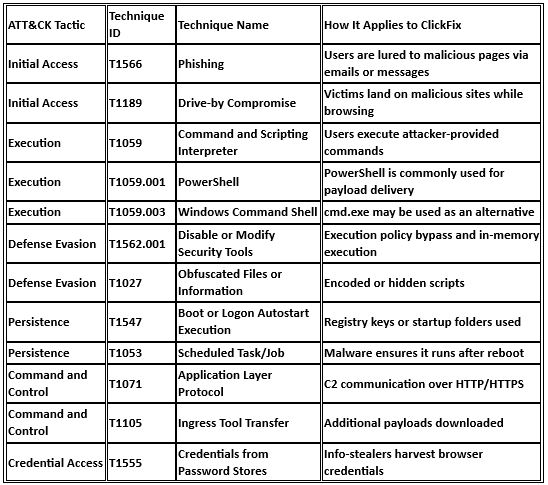
13. MITRE ATT&CK Overview (Simplified)
ClickFix commonly involves:
14. How Security Teams Detect ClickFix
On the Endpoint:
- PowerShell running in hidden mode
- Unusually long command-line arguments
- PowerShell launched after browser activity
- MSHTA making outbound internet connections
On the Network:
- PowerShell downloading remote content
- Connections to newly created or unknown domains
- Small script downloads followed by encrypted traffic
15. How to Prevent ClickFix
For All Users:
- Never paste commands from websites
- Close the browser immediately
- Report the incident to IT or security
- Remember: CAPTCHA never requires commands
For IT and Security Teams:
- Limit PowerShell for standard users
- Disable
mshta.exeif not required - Log command-line arguments
- Monitor clipboard-to-command execution behavior
- Train users using real-world examples
16. Realistic Phishing Simulation Scenario
Scenario Name: Human Verification Required
What the user receives:
- An email or link saying “Verify Account”
- A fake CAPTCHA page
- Instructions to paste a command
If the user runs it:
A training message appears explaining this was a ClickFix simulation.
Learning outcome:
- The user understands the danger
- The user learns when to stop and report
17. One Simple Rule to Remember
If a website tells you to paste and run a command, it is a scam.
No exceptions.
18. Final Takeaway
ClickFix attacks do not break computers.
They trick people.
Technology alone cannot stop ClickFix.
Awareness is the strongest defense.
