

Security researchers and security teams at LastPass are warning users about a new phishing campaign that is actively circulating and targeting password-manager customers. The attackers behind this campaign are sending emails that closely mimic legitimate LastPass communications, making them difficult to distinguish from real alerts at a quick glance. The goal is simple but dangerous: to trick users into handing over the one credential that protects everything else—their master password.
The fake emails claim that LastPass is undergoing an urgent “infrastructure update” or “scheduled maintenance.” According to the message, users are told they must back up their password vaults immediately or risk losing access to their stored data. To increase pressure, the emails usually include a tight deadline, often warning that action must be taken within 24 hours. While this kind of message is designed to sound official and alarming, LastPass has confirmed that these alerts are completely fraudulent.
Malicious URLs and associated IPs:
- “group-content-gen2.s3.eu-west-3.amazonaws[.]com/5yaVgx51ZzGf”
- Serving IP address at time of publication: 52.95.155[.]90
- “mail-lastpass[.]com”
- Associated IP addresses at time of publication:
- 104.21.86[.]78
- 172.67.216[.]232
- 188.114.97[.]3
- Associated IP addresses at time of publication:
Header information:
From:
- support@sr22vegas[.]com
- support@lastpass[.]server8
- support@lastpass[.]server7
- support@lastpass[.]server3
Associated IPs:
- 192.168.16[.]19
- 172.23.182.202
Subjects:
- LastPass Infrastructure Update: Secure Your Vault Now
- Your Data, Your Protection: Create a Backup Before Maintenance
- Don’t Miss Out: Backup Your Vault Before Maintenance
- Important: LastPass Maintenance & Your Vault Security
- Protect Your Passwords: Backup Your Vault (24-Hour Window)
What the Fake Emails Look Like
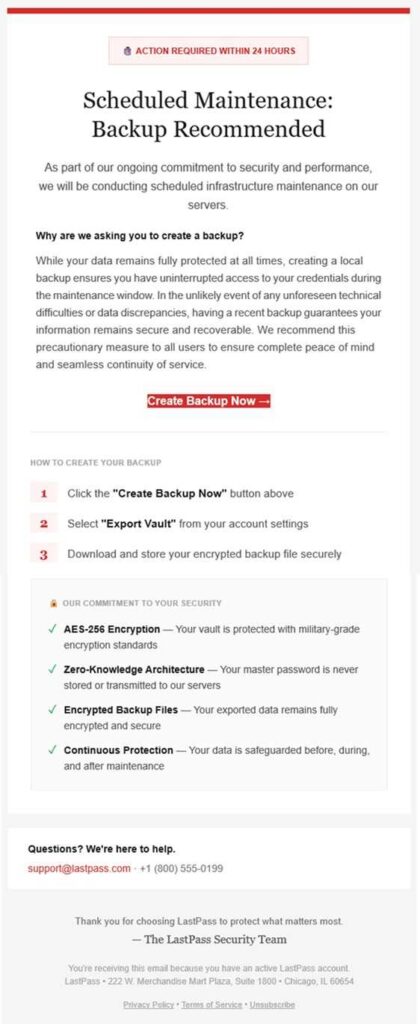
The phishing messages are carefully crafted to feel authentic. They often use professional language and branding that closely resembles real LastPass notifications. Common subject lines include phrases such as “LastPass Infrastructure Update: Secure Your Vault Now,” “Your Data, Your Protection: Create a Backup Before Maintenance,” or “Protect Your Passwords: Backup Your Vault (24-Hour Window).”
Inside the email, users are encouraged to click a prominent button or link labeled something like “Create Backup Now.” While the link may look legitimate on the surface, it actually redirects to a malicious phishing site. In some cases, these sites are hosted on trusted cloud platforms, which can make them appear safer than they really are. Once there, victims may be prompted to enter their master password or other sensitive information, unknowingly handing full access to attackers.
Why This Is So Dangerous
The master password is the single key to a LastPass vault. If attackers obtain it, they can potentially unlock everything stored inside: website logins, banking credentials, work accounts, secure notes, and even saved two-factor authentication data. Unlike a single compromised account, a stolen master password can trigger a cascade of account takeovers across dozens—or even hundreds—of services tied to one user.
This is why phishing campaigns aimed at password managers are especially high-risk. One successful trick can give criminals access to an entire digital life.
LastPass’ Official Response
LastPass has been clear in its response to the campaign. The company has stated that it is not asking users to back up their vaults under short deadlines and is not performing any emergency updates that would require immediate action via email. Most importantly, LastPass emphasizes that it will never ask users to share their master password through email messages or links.
The company is actively working with hosting providers and security partners to identify and take down the malicious domains involved. Users are encouraged to forward suspicious emails to [email protected] so they can be investigated and blocked more quickly.
How to Protect Yourself
Staying safe comes down to slowing down and verifying before you act. Always check the sender’s email address carefully, as scammers often rely on look-alike domains that differ by only a character or two. Avoid clicking links in unsolicited security emails altogether. If you’re concerned about your account, open a new browser window and visit the official LastPass website or app directly.
Never enter your master password on a page you reached by clicking an email link. Using browser-based phishing protection tools can also help block known malicious sites before they load. Finally, enabling multi-factor authentication adds an extra layer of security that can limit damage even if a password is exposed.
A Final Reminder
Urgency is one of the most common tools used by phishing attackers. Emails that demand immediate action, threaten account loss, or impose short deadlines are designed to make you react before thinking. Taking a moment to verify can be the difference between staying secure and losing control of your accounts.
