

What is Kerberoasting?
Kerberoasting is an attack that happens in a network that uses a special security system called Kerberos (common in companies using Active Directory). When you try to access things like email, files, or servers, Kerberos checks who you are to make sure you’re allowed to do so. The problem is, attackers can trick the system and steal passwords from important accounts that run these services.
Here’s the big idea: The attacker doesn’t need to hack into the service directly. Instead, they can request encrypted tickets from the system that prove they are allowed to use the service. These tickets are encrypted with the password of the service account. Once they have the encrypted ticket, they try to crack it to get the password of the service account.
Why is Kerberoasting Dangerous?
- Service Accounts Are Powerful:
- Service accounts often have high-level privileges. This means they can access a lot of important data or do things in the system that regular user accounts can’t do.
- If the attacker steals the password of one of these service accounts, they can gain access to sensitive data or even take control of important services like email servers or databases.
- Hard to Detect:
- The attacker doesn’t break into the system right away. They’re using the Kerberos authentication system in a normal way, which makes it harder to spot.
- The only suspicious activity is when they try to crack the encrypted tickets, which usually happens offline, making it less obvious.
- Exploiting Weak Passwords:
- Many service accounts use weak or easy-to-guess passwords, which is a big risk. If an attacker gets one of these tickets, they can often crack it quickly.
How Does Kerberoasting Work?
Here’s how an attacker might carry out a Kerberoasting attack:
Step 1: Find Service Accounts
- In a company’s network, there are service accounts that run services (like SQL servers or email servers). Each service has a unique name (called Service Principal Name or SPN).
- The attacker scans the network to find these service accounts by looking for SPNs.
Step 2: Request Service Tickets
- Once the attacker knows which services are running, they send a request to the system asking for a service ticket for each service.
- The system sends them a Kerberos ticket for the service they asked for. This ticket is encrypted with the service’s password (which is secret).
Step 3: Extract the Service Tickets
- The attacker doesn’t try to access the service right away. Instead, they extract the service ticket from the system using tools like Mimikatz or Rubeus.
Step 4: Crack the Tickets
- The attacker takes the ticket (which is encrypted) and tries to crack it offline using password-cracking tools. These tools basically try different password combinations to see if they can find the right one.
- If the password is weak (like “Password123”), they can crack it fairly easily.
Step 5: Gain Access
- Once the attacker has cracked the password, they can log in to the service account and use it to access sensitive resources or gain more control within the network.
Real-World Example of Kerberoasting:
Let’s say you’re working as an attacker in a company and you want to get access to sensitive data.
- Step 1 – Find Service Accounts:
- You use tools like PowerView to look for Service Principal Names (SPNs) in the network. You find that there’s an account called SQLService that runs the company’s SQL database.
- Step 2 – Request Service Tickets:
- You send a request to the system for a Kerberos service ticket for the SQLService account, which is used to run the database.
- Step 3 – Extract the Tickets:
- You use a tool like Rubeus to extract the service ticket from the system.
- Step 4 – Crack the Ticket:
- You take the encrypted ticket offline and use a password-cracking tool like John the Ripper to try and figure out the password of the SQLService account. Since the password is weak (e.g., “password123”), you crack it in just a few minutes.
- Step 5 – Access the Service:
- Now that you have the password for SQLService, you can log into the SQL server and access the company’s confidential data.
Why is Kerberoasting So Dangerous?
- Privileged Accounts:
- Service accounts like the one running SQLServer usually have special permissions and can access sensitive data. Gaining control over these accounts is like getting the keys to the kingdom.
- Undetected Attack:
- Since the attacker is only requesting normal service tickets and cracking them offline, there’s no immediate sign of the attack. It’s harder for security tools to detect the attacker’s activities.
- Weak Passwords:
- If companies don’t use strong, complex passwords for service accounts, it becomes easy for attackers to crack them and gain access to important resources.
Diagram of Kerberoasting Attack:
This diagram helps visualize how the Kerberoasting attack flows:
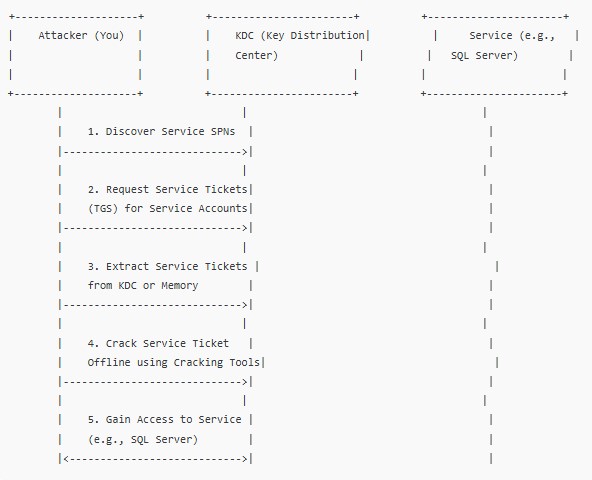
Summary of Kerberoasting:
- Kerberoasting is an attack where the attacker steals service account passwords by requesting and cracking Kerberos service tickets.
- The attacker requests tickets for services like SQL Server or Web Services, extracts those tickets, and tries to crack the password offline using tools like John the Ripper or Hashcat.
- Once the password is cracked, the attacker gains access to the service and can potentially steal sensitive information or escalate their access to other systems.
- Service accounts often have high privileges, making them valuable targets. Weak passwords on these accounts make it easier for attackers to succeed.
How to Prevent Kerberoasting:
- Use Strong, Complex Passwords:
- Make sure service accounts have strong, unique passwords to prevent cracking.
- Regularly Rotate Passwords:
- Change passwords for service accounts regularly to reduce the risk of an attacker using a cracked password.
- Use Managed Service Accounts:
- Use Managed Service Accounts (MSAs) to automatically manage service account passwords and prevent easy exploitation.
- Monitor SPNs:
- Regularly monitor and audit SPNs to spot any unusual requests for service tickets that might indicate an attack.
