

What is Kerberos Authentication?
In simple terms, Kerberos Authentication is a way of proving who you are (authentication) when you try to access a service or resource in a network, like a file server or email. Instead of sending your password repeatedly, Kerberos uses a system of encrypted tickets to prove your identity securely.
How Kerberos Authentication Works:
- The Need for Kerberos:
- In a corporate network, you might need to access multiple services like a file server, email system, or database. Instead of typing your password each time, Kerberos allows you to log in once and then use tickets to access all those services securely.
- Key Components of Kerberos Authentication:
- Client: This is the user or computer trying to access a service (e.g., your workstation).
- Server: The service you want to access, such as an email server or file server.
- KDC (Key Distribution Center): The trusted authority that helps with authentication. It’s made up of two parts:
- AS (Authentication Server): Issues a Ticket Granting Ticket (TGT) after verifying the client’s credentials.
- TGS (Ticket Granting Service): Issues service tickets for specific services that the client can use.
Steps in Kerberos Authentication:
Step 1: Initial Login Request (TGT Request)
- Login to Your Computer:
- You enter your username and password to log into your computer. When you do this, your computer needs to authenticate you to the KDC (Key Distribution Center).
- The KDC’s Authentication Server (AS) checks your credentials, using your password to generate an encrypted response.
- TGT Request:
- After verifying your login, the Authentication Server (AS) responds with a Ticket Granting Ticket (TGT). This TGT is like a special ID card that proves you are who you say you are.
- Key point: The TGT is encrypted by the KDC and only your computer can decrypt it, ensuring that your password is not transmitted over the network.
Step 2: Request Service Access (TGS Request)
- Accessing a Service (e.g., File Server or Email):
- After logging in, you want to access a service, such as your email server or file server.
- Instead of typing your password again, your computer sends the TGT to the KDC’s Ticket Granting Service (TGS) to request a Service Ticket for the specific service (e.g., email server, file server).
- Service Ticket Request:
- The TGS verifies the TGT and generates a Service Ticket encrypted with the password of the service you want to access (e.g., the email server’s password). This ensures only authorized users can access that service.
Step 3: Accessing the Service
- Presenting the Service Ticket:
- Once you have the Service Ticket, you can present it to the service (like the email server or file server) you want to access.
- The service decrypts the Service Ticket with its own secret key and checks if it’s valid. If everything checks out, it grants you access.
- Using the Service:
- Now, you can use the service (e.g., checking your email or accessing a shared file) without needing to enter your password again.
Kerberos Authentication Diagram:
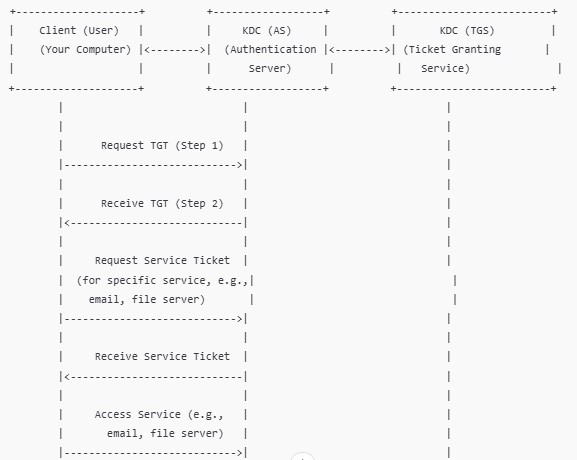
Explanation of the Diagram:
- Client (User):
- This is your computer or device. The user logs in using their credentials (username and password).
- The client requests a Ticket Granting Ticket (TGT) from the Authentication Server (AS) to prove their identity.
- KDC (AS – Authentication Server):
- The Authentication Server (AS) checks the user’s credentials.
- After successful verification, the AS issues a TGT (Ticket Granting Ticket) to the client. This TGT is encrypted and stored on the user’s device.
- KDC (TGS – Ticket Granting Service):
- The client now wants to access a specific service (e.g., email server, file server).
- The client sends the TGT to the Ticket Granting Service (TGS) to request a Service Ticket for the specific service it wants to access.
- The TGS validates the TGT, then issues a Service Ticket that is encrypted with the service’s password.
- Accessing the Service:
- The client presents the Service Ticket to the service (email server, file server, etc.).
- The service decrypts the ticket using its own secret key and grants access to the client if everything checks out.
Real-World Example of Kerberos Authentication:
Let’s say you work at a company and use a Windows domain network. Here’s how Kerberos Authentication works when you access your email:
- Step 1 – Logging in:
- You sit down at your work computer, type your username and password, and press Enter.
- Your computer doesn’t send your password directly over the network. Instead, it sends a request to the KDC (Authentication Server) to get a Ticket Granting Ticket (TGT).
- Step 2 – KDC Verifies and Issues TGT:
- The Authentication Server (AS) verifies your username and password. If everything checks out, it sends back a TGT.
- This TGT is encrypted and stored on your computer. It’s like a digital passport that proves you are authenticated.
- Step 3 – Requesting Email Access:
- Now, you want to check your work email. You open your email application, which asks for the TGT.
- Your computer sends the TGT to the Ticket Granting Service (TGS) to request a Service Ticket for the email server.
- Step 4 – TGS Issues Service Ticket:
- The TGS checks the TGT to ensure it’s valid and then issues a Service Ticket that’s encrypted with the email server’s password.
- This Service Ticket proves to the email server that you’re authorized to access it.
- Step 5 – Accessing the Email:
- Your computer sends the Service Ticket to the email server.
- The email server decrypts the ticket using its own secret key and grants you access to your email inbox.
- Step 6 – You’re in:
- Now, you can read and send emails without needing to enter your password again.
Summary of Key Points in Kerberos Authentication:
- Kerberos Authentication allows secure access to services without needing to send your password each time.
- TGT (Ticket Granting Ticket): This proves your identity and is issued when you first log in.
- TGS (Ticket Granting Service): This issues Service Tickets that allow you to access specific services.
- Service Ticket: This proves your identity to a specific service (e.g., email server, file server) without needing a password.
Why Kerberos Authentication is Important:
- Security: Passwords are never sent over the network, reducing the risk of interception by attackers.
- Efficiency: You only log in once, and then you can access all the services you need without repeatedly entering your password.
- Trust: Kerberos relies on the KDC, a trusted authority, to validate your identity, ensuring that both the client and server are who they claim to be.
