

In mid-January 2026, security researchers from Microsoft Defender Experts uncovered a credential-stealing campaign that relied on fake virtual private network (VPN) clients distributed through search engine optimization (SEO) poisoning. The operation redirected users who were searching online for legitimate enterprise VPN software to malicious downloads. These downloads contained trojans disguised as trusted VPN installers that were digitally signed to appear legitimate while secretly collecting VPN login credentials.
Microsoft Threat Intelligence linked this activity to the financially motivated cybercriminal group Storm-2561, which has been active since May 2025. The group is known for spreading malware by manipulating search engine rankings and impersonating well-known software vendors. In this campaign, the attackers targeted users looking for VPN software—an approach that exploits both the urgency users often feel when trying to connect to corporate networks and the trust people place in high-ranking search results.
The malicious ZIP archives used in the attack were hosted in GitHub repositories, though these repositories have since been removed. The malware was also signed with a legitimate digital certificate belonging to Taiyuan Lihua Near Information Technology Co., Ltd., which has now been revoked.
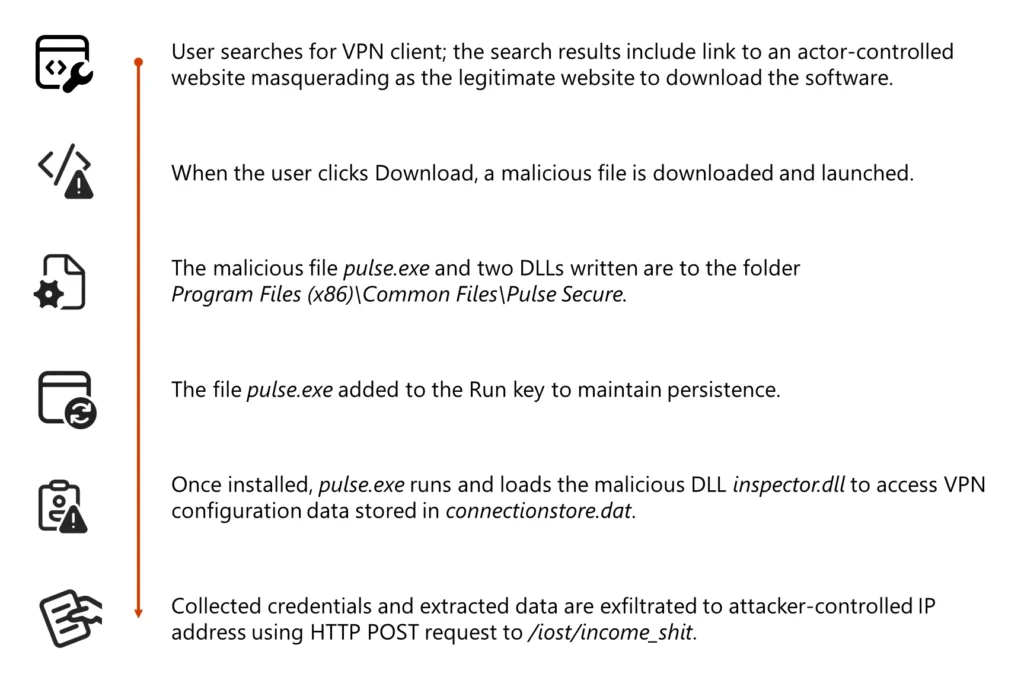
Overview of the Storm-2561 Attack Chain
The attack begins when users search for legitimate VPN software online. Due to SEO poisoning, attacker-controlled websites appear prominently in search results for queries such as “Pulse VPN download” or “Pulse Secure client.” These websites imitate the appearance of trusted VPN vendor pages.
When a victim attempts to download the software, they are redirected to a malicious GitHub repository hosting a ZIP file that supposedly contains the VPN client installer. The ZIP archive includes a Microsoft Windows Installer (MSI) package designed to look like a legitimate VPN installation file.
Once executed, the installer deploys a program that masquerades as a VPN client but secretly loads malicious dynamic link library (DLL) files. While appearing to function as a normal VPN application, the software collects and transmits user credentials to the attacker.
This method aligns with Storm-2561’s financially motivated cybercrime model, which focuses on stealing credentials that could later be used for unauthorized network access or sold on underground marketplaces.
Initial Access and Malware Delivery
The attackers relied on SEO manipulation to direct users to spoofed domains such as:
- vpn-fortinet[.]com
- ivanti-vpn[.]org
From these pages, victims were prompted to download a file hosted at:
hxxps[:]//github[.]com/latestver/vpn/releases/download/vpn-client2/VPN-CLIENT.zip
Although the repository has since been removed, the ZIP archive originally contained a fake VPN installer disguised as a legitimate Pulse Secure client.
When executed, the MSI file installed Pulse.exe along with several malicious DLL files inside a directory designed to mimic the real installation path:
%CommonFiles%\Pulse Secure
This tactic helped the malware blend into the system and appear trustworthy to users and administrators.
DLL Side-Loading and Infostealer Deployment
During installation, the fake VPN client deployed two malicious DLL files:
- dwmapi.dll
- inspector.dll
The dwmapi.dll component functioned as an in-memory loader that extracted and executed shellcode. This shellcode then loaded inspector.dll, which is a variant of the Hyrax infostealer.
Once active, the Hyrax malware searched the system for VPN-related information and extracted:
- VPN login credentials
- VPN connection URIs
- Stored VPN configuration data
The stolen information was then transmitted to attacker-controlled command-and-control (C2) servers.
Abuse of Digital Code Signing
One notable feature of this campaign was the misuse of a valid digital certificate issued to Taiyuan Lihua Near Information Technology Co., Ltd. The attackers signed the MSI installer and malicious DLLs with this certificate, which helped the malware appear legitimate.
This tactic offers several advantages to attackers:
- Suppresses Windows warnings typically shown for unsigned software
- Potentially bypasses application whitelisting policies that trust signed binaries
- Reduces security alerts triggered by unsigned malware
- Enhances the perceived legitimacy of the installer
Microsoft also discovered additional malware samples signed with the same certificate, many of which impersonated different VPN products.
Credential Harvesting Process
After installation, the fake VPN client displayed a graphical interface almost identical to the real Pulse Secure VPN client. Victims were prompted to log in as they normally would when connecting to a corporate network.
Instead of establishing a VPN session, the application captured the credentials entered and transmitted them to attacker infrastructure located at:
194.76.226[.]93:8080
The credential theft workflow followed several steps:
- User interface display – A realistic VPN login window appears.
- Credential submission – Victims enter their usernames and passwords.
- Error message – The application displays a fake error indicating installation failure.
- Redirection – Users are instructed to download the real VPN client.
- Data collection – The malware extracts configuration data from C:\ProgramData\Pulse Secure\ConnectionStore\connectionstore.dat
- Exfiltration – Credentials and VPN configuration data are sent to the attackers.
Persistence Mechanism
To ensure continued access, the malware establishes persistence by creating an entry in the Windows RunOnce registry key, causing Pulse.exe to execute automatically when the system restarts.
Defense Evasion Through User Redirection
A particularly deceptive part of the attack occurs after the credentials are stolen. The malware attempts to remove suspicion by guiding the victim toward installing the legitimate VPN software.
After capturing credentials, the application:
- Displays a convincing error message about installation failure
- Provides instructions to download the official VPN client
- In some cases, opens the legitimate vendor website in the user’s browser
If the victim installs the real VPN afterward and successfully connects, they may assume the initial failure was a technical issue rather than a security compromise.
Microsoft’s Mitigation Recommendations
To reduce exposure to threats like this campaign, Microsoft recommends several defensive measures:
Strengthen endpoint protection
- Enable cloud-delivered protection in Microsoft Defender Antivirus or equivalent security tools.
- Use Endpoint Detection and Response (EDR) in block mode to stop malicious artifacts even if the primary antivirus misses them.
Improve network and web protection
- Enable network protection and web protection in Microsoft Defender for Endpoint.
- Use browsers such as Microsoft Edge that support SmartScreen to block malicious websites.
Strengthen identity security
- Enforce multifactor authentication (MFA) for all accounts and remove MFA exceptions.
- Prevent storing enterprise credentials in browsers or personal password vaults.
- Disable browser password syncing on managed devices through Group Policy.
Apply attack surface reduction rules
- Block executable files that do not meet trusted, prevalence, or age criteria.
Detection Capabilities in Microsoft Defender
Microsoft Defender provides protection across multiple stages of the attack:
Execution
- Detects malware such as
- Trojan:Win32/Malgent
- TrojanSpy:Win64/Hyrax
Defense evasion detection
- Alerts when an executable loads unexpected DLL files.
Persistence detection
- Flags anomalies in auto-start extensibility point (ASEP) registry entries.
Threat Intelligence and Hunting
Security teams using Microsoft Defender XDR can access threat intelligence reports about this campaign and the Storm-2561 threat actor. Advanced hunting queries can also identify:
- Files signed by the compromised certificate
- Suspicious DLL activity within directories resembling Pulse Secure installations
These capabilities help security teams detect potential compromises within their environments.
Indicators of Compromise (IOCs)
Key Malware File Hashes
| File | SHA-256 |
|---|---|
| VPN-Client.zip | 57a50a1c04254df3db638e75a64d5dd3b0d6a460829192277e252dc0c157a62f |
| VPN-Client.msi | 862f004679d3b142d9d2c729e78df716aeeda0c7a87a11324742a5a8eda9b557 |
| dwmapi.dll | 6c9ab17a4aff2cdf408815ec120718f19f1a31c13fc5889167065d448a40dfe6 |
| inspector.dll | 6129d717e4e3a6fb4681463e421a5603b640bc6173fb7ba45a41a881c79415ca |
Additional malware files signed with the compromised certificate include:
- Pulse.exe
- Sophos-Connect-Client.exe
- GlobalProtect-VPN.exe
- VPN-Client.exe
- vpn.exe
- WiredAccessMethod.dll
- PulseSecureService.exe
Infrastructure
Command and Control IP
- 194.76.226[.]93
Credential Exfiltration Domains
- vpn-connection[.]pro
- myconnection[.]pro
Malicious or Spoofed Domains
- checkpoint-vpn[.]com
- cisco-secure-client[.]es
- forticlient-for-mac[.]com
- forticlient-vpn[.]de
- forticlient-vpn[.]fr
- forticlient-vpn[.]it
- forticlient[.]ca
- forticlient.co[.]uk
- forticlient[.]no
- fortinet-vpn[.]com
- ivanti-vpn[.]org
- ivanti-secure-access[.]de
- ivanti-pulsesecure[.]com
- sonicwall-netextender[.]nl
- sophos-connect[.]org
- vpn-fortinet[.]com
- watchguard-vpn[.]com
Conclusion
The Storm-2561 campaign highlights how cybercriminal groups continue to exploit trusted platforms, legitimate certificates, and well-known software brands to steal sensitive information. By manipulating search engine results and distributing malware disguised as enterprise VPN clients, attackers can capture credentials from unsuspecting users who believe they are installing legitimate software.
The campaign also demonstrates the growing sophistication of credential-harvesting operations, particularly the use of post-attack redirection to legitimate software to conceal malicious activity.
Organizations can reduce risk by implementing strong endpoint protection, enforcing multifactor authentication, monitoring certificate abuse, and educating users about the dangers of downloading enterprise software from unofficial sources.
