

A fraudulent campaign has been identified in which attackers distribute malicious calendar invitations pretending to originate from Malwarebytes billing services. The intent of the campaign is to trick recipients into believing they have been charged for a subscription renewal and force them to contact a fraudulent “billing support” phone number.
Instead of directing victims to a malicious website, this campaign relies on voice-based social engineering. Victims are urged to immediately call a phone number listed in the calendar event to dispute a supposedly processed charge. Once the victim contacts the number, attackers attempt to obtain financial information, install remote-access software, or manipulate the victim into transferring funds.
The scam relies on urgency and financial pressure, using large subscription charges—often several hundred dollars over multiple years—to provoke an immediate reaction before the victim verifies the legitimacy of the notice.
Threat Overview
| Attribute | Details |
|---|---|
| Threat Type | Social engineering / Voice phishing (Vishing) |
| Delivery Method | Malicious calendar invitations |
| Impersonated Entity | Malwarebytes billing service |
| Objective | Financial fraud, credential theft, remote system access |
| Primary Vector | Phone-based social engineering |
Attackers use calendar invitations instead of traditional phishing emails to bypass common security awareness patterns. The event description is designed to resemble a billing receipt, while the real objective is to encourage victims to call a scam support line.
Attack Methodology
Initial Delivery
Victims receive an unsolicited calendar event in platforms such as:
- Google Calendar
- Microsoft Outlook Calendar
- Apple Calendar
- Mobile calendar applications
The event title typically suggests a successful payment or subscription renewal.
Example themes include:
- Subscription Renewal Notice
- Payment Processed Successfully
- Renewal Approved
Recipients usually did not schedule or request this event, which is a strong indicator of malicious activity.
Social Engineering Strategy
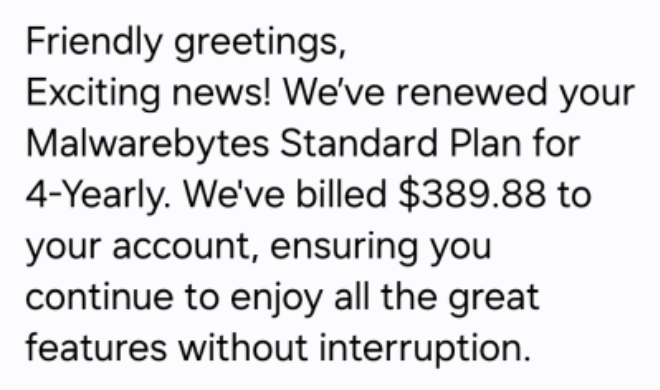
The calendar description is written to resemble an automated billing notification. The message attempts to convince the recipient that a large renewal charge has already been processed.
Common characteristics include:
- Subscription fees of several hundred USD
- Multi-year membership renewals
- Fake confirmation messages implying the transaction has already occurred
This approach is designed to create urgency, pushing the victim to react immediately rather than verify the information.
The description typically instructs the victim to call a support number immediately to cancel or dispute the transaction.
Characteristics of the Fake Calendar Invite
The body of the event contains fabricated billing details to make the message appear legitimate. These details commonly include:
Fake Account Identifiers
The invitation often lists multiple identification fields such as:
- Membership ID
- Client UID
- Customer ID
- Service Number
These identifiers are typically random strings meant to simulate a billing system.
Fabricated Transaction Data
Messages may include:
- Random account or transaction codes
- Order confirmation numbers
- Product descriptions not actually offered by the impersonated company
In some cases, the message advertises products not present in the Malwarebytes product portfolio, revealing the fraudulent nature of the notice.
Language and Formatting Indicators
The wording frequently appears copied from generic scam templates rather than legitimate corporate communications.
Common anomalies include:
Unnatural or Incorrect Phrasing
Examples observed in the campaign:
- “Membership Duration: 4yrold”
- “We’re thrilled to have you with us for another year!” in a four-year renewal notice
- “Your membership benefits remain fully active.”
Inconsistent Formatting
Formatting irregularities are also common:
- “FOUR YEAR” in all caps
- “04 Year” written inconsistently
- “USD344.55” without proper spacing
Unusual Phone Number Formatting
Phone numbers often appear with irregular punctuation or spacing, such as:
1.810.228.87081 865 3849684
Generic Greetings and Closings
Messages frequently contain exaggerated or overly formal language:
Greetings:
- “Dear Sir/Madam”
- “Greetings to all”
- “Hello there”
Closings:
- “Yours in Respect”
- “Much Gratitude”
- “Always Appreciative”
- “With Joy, best regards”
While one of these issues alone may simply indicate poor writing, multiple inconsistencies appearing together in a billing notice strongly indicate fraud.
Post-Call Attack Scenarios
The primary goal of the calendar invitation is to trick the recipient into calling the attacker directly. Once contact is established, several types of fraud may occur.
Theft of Payment Information
A common interaction pattern includes:
- The victim calls the number to dispute the charge.
- The scammer claims the charge was an error and offers to reverse it.
- The victim is asked to provide financial details to process the refund.
Requested information may include:
- Full credit or debit card number
- Expiration date and CVV code
- Bank account and routing numbers
- One-time authentication codes from the bank
This information enables attackers to perform:
- Unauthorized purchases
- Bank withdrawals
- Fraudulent subscription enrollments
- Identity theft activities
Refund Manipulation Scam
In some variations, the attacker claims that a refund was mistakenly issued for too much money.
Victims may be instructed to:
- Log into their online banking account while on the call
- Transfer funds to “correct the mistake”
- Send payments via unconventional methods
Common payment channels requested include:
- Gift cards
- Cryptocurrency
- Wire transfers
- Peer-to-peer payment apps
The victim ultimately transfers real money to resolve a fake financial error.
Remote Access Installation
Attackers sometimes escalate the interaction by asking the victim to install legitimate remote-access software such as:
- AnyDesk
- TeamViewer
They claim access is needed to:
- Cancel the subscription
- Verify the user’s account
- Process the refund
Once remote access is granted, attackers may:
- Capture login credentials
- Steal session cookies
- Download or upload files
- Install malware
- Manipulate browser content to fabricate proof of refunds
Prolonged access significantly increases the risk of system compromise.
Personal Information Harvesting
Even if financial data is not obtained, attackers may attempt to gather personal information including:
- Full name
- Home address
- Date of birth
- Email account credentials
- Security question answers
Combined with other leaked or purchased data, this information can later be used for:
- New account fraud (loans, credit cards)
- Email or cloud account takeover
- Highly targeted phishing attacks
Trust Building for Future Fraud
Attackers often appear calm, polite, and professional during calls. The goal is to convince victims that they represent the legitimate company referenced in the invitation.
Once trust is established, attackers may:
- Contact the victim again weeks or months later with a new scam
- Sell the victim’s information to other fraud groups
- Continue long-term social engineering attempts
The consistent tactic across all variations is to pressure victims into acting quickly and privately, discouraging them from verifying the charge with their bank or the real company.
Indicators of Calendar-Based Phishing
Legitimate service providers typically deliver billing communications through:
- Official email notifications
- In-application alerts
- Customer account dashboards
They do not send invoices or receipts through unsolicited calendar events created by unknown senders.
Common warning signs include:
- Billing notifications appearing as calendar events rather than emails
- Event titles resembling transaction confirmations
- Random codes or identifiers in the event title
- Events created by unknown individuals or external email addresses
- Charges for subscriptions the recipient never purchased
Any unexpected billing notice appearing directly in a calendar application should be treated as potentially malicious.
Mitigation and Prevention
Organizations and users can reduce risk by implementing the following controls:
Calendar Security Settings
- Disable automatic addition of calendar invitations.
- Require manual acceptance before events appear on the calendar.
- Restrict permissions so only trusted users or applications can create events.
Access Control for Shared Calendars
For shared or organizational calendars:
- Remove public or anonymous access.
- Limit event creation and editing privileges.
- Monitor unusual calendar activity.
Endpoint Protection
Deploy an up-to-date anti-malware solution with web protection capabilities to block known malicious domains and suspicious downloads.
User Awareness
Users should:
- Avoid interacting with unsolicited calendar events.
- Never call phone numbers included in suspicious invitations.
- Delete suspicious events immediately.
- Avoid clicking links or opening attachments from unknown calendar entries.
Multi-Factor Authentication
Enable multi-factor authentication (MFA) on email and cloud accounts to prevent attackers from abusing compromised credentials to send or auto-accept calendar invitations.
Indicator of Compromise (IOC)
The following phone numbers have been associated with the campaign:
- (810) 228-2614
- (810) 228-8708
- (810) 268-6113
- (865) 384-9684
- (865) 385-0070
These numbers should be blocked or monitored within organizational communication systems where possible.
Conclusion
This campaign demonstrates how attackers continue to adapt traditional phishing techniques by exploiting less-monitored communication channels such as calendar systems. By shifting the attack vector from links to phone calls, threat actors rely heavily on real-time social engineering and psychological pressure.
Organizations should ensure both technical controls and user awareness training cover emerging threats involving calendar platforms, voice phishing, and impersonation scams. Early detection and proper reporting of suspicious calendar events can significantly reduce the likelihood of financial loss and system compromise.
