

Modern warfare is no longer confined to physical battlefields; it increasingly extends into cyberspace. The ongoing tensions in the Middle East involving the United States, Israel, and Iran have created a climate of fear and uncertainty. Threat actors actively exploit this psychological vulnerability, leveraging global crises to launch sophisticated phishing and disinformation campaigns.
Campaign Overview
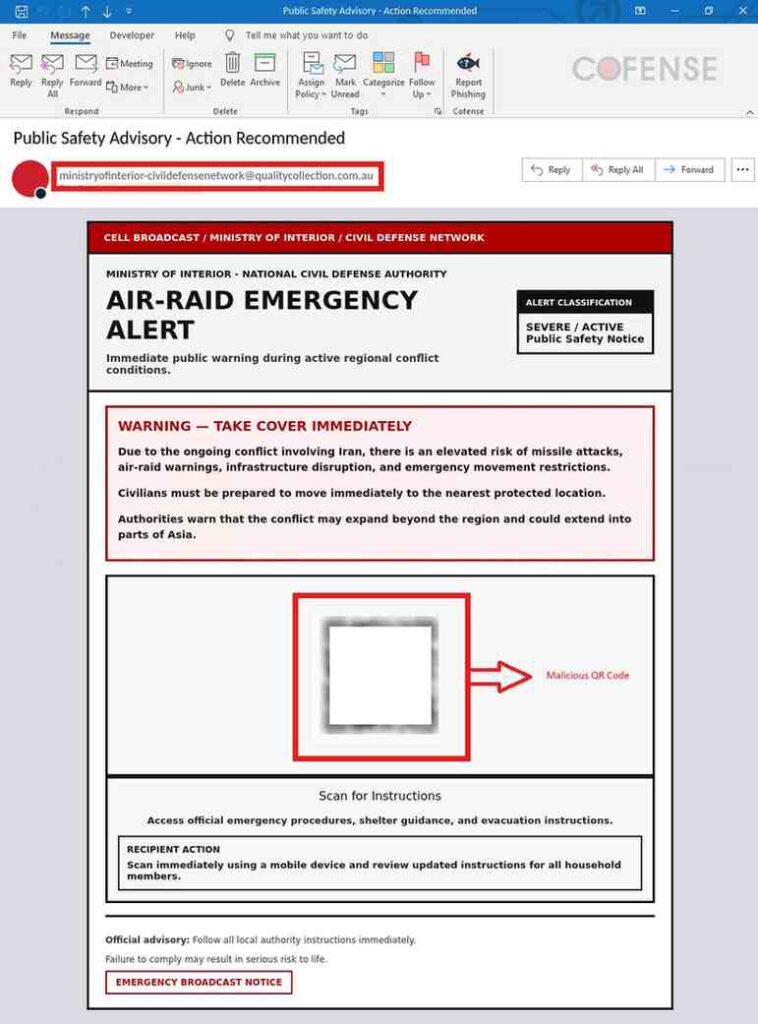
Researchers has identified a targeted phishing campaign impersonating government emergency communications. The attack masquerades as a critical alert from entities such as the Ministry of Interior and Civil Defense, using high-severity language like “SEVERE / ACTIVE” to simulate urgency.
- Subject Line: Public Safety Advisory – Action Recommended
- Sender Address (IOC):
ministryofinterior-civildefensenetwork@qualitycollection[.]com[.]au
This message leverages fear-based social engineering, warning recipients of imminent missile attacks and urging immediate action.
Social Engineering Tactics
The email demonstrates several classic phishing characteristics:
- Authority Impersonation: Mimics official government agencies
- Urgency Triggers: Encourages immediate response (“take cover immediately”)
- Lack of Personalization: Indicates bulk distribution
- QR Code Delivery: Avoids traditional malicious links to bypass detection
The use of QR codes is particularly notable, as it shifts the attack vector from email-based link scanning to mobile-based interaction, reducing the likelihood of detection by conventional email security tools.
Attack Flow Breakdown
- Initial Access:
The victim scans the QR code embedded in the email. - Human Verification Layer:
The user is redirected to a fake “human verification” page.- Mimics CAPTCHA-like behavior
- Builds trust through familiar interaction patterns
- Reduces suspicion before credential harvesting
- Credential Harvesting:
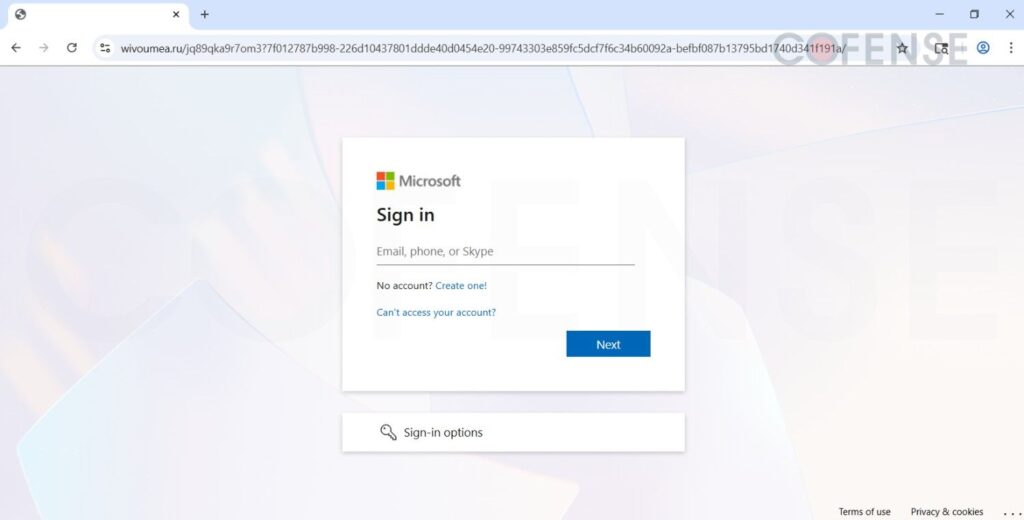
The final stage presents a spoofed login page resembling the Microsoft authentication portal.- High visual fidelity
- Designed to capture enterprise or personal credentials
Indicators of Compromise (IOCs)
ministryofinterior-civildefensenetwork@qualitycollection[.]com[.]au- Stage 1 – Observed Email Infection URL:
Infection URL IP(s): - hXXps://ministry[.]sharedfilescorps[.]com/interior/$
- 104[.]21[.]91[.]60
- 172[.]67[.]167[.]123
- Stage 2 – Observed Payload URL(s):
Payload IP(s): - hXXps://global[.]sharedfilescorps[.]com/interior/
- 104[.]21[.]91[.]60
- 172[.]67[.]167[.]123
- hXXps://wivoumea[.]ru/HAPApOYtrk1Zzs0iF6mk@/$
- 104[.]128[.]128[.]129
Key Takeaways
- Threat actors are increasingly aligning phishing campaigns with real-world geopolitical events
- QR code-based phishing (“quishing”) is gaining traction
- Multi-stage attacks enhance credibility and success rates
- Familiar branding (e.g., Microsoft login pages) increases victim trust
Our Opinion on This Campaign
This campaign highlights a dangerous evolution in phishing strategies, combining psychological manipulation with technical sophistication. Several critical observations emerge:
- Exploitation of Fear:
Leveraging geopolitical conflict is highly effective because it reduces user skepticism. In crisis scenarios, individuals prioritize speed over verification. - Shift to Mobile Attack Vectors:
QR codes represent a growing blind spot in cybersecurity defenses. Many organizations still lack robust controls for mobile-based threat detection. - Layered Deception:
The inclusion of a “human verification” step is particularly clever. It mimics legitimate web security practices, conditioning users to trust the process. - Brand Abuse at Scale:
The use of Microsoft-themed login pages demonstrates how attackers rely on widely trusted platforms to maximize credential theft success. - Defensive Gaps:
Traditional email security solutions may not fully detect QR-based payloads, indicating a need for updated security awareness training and tooling.
Recommendations
- Train users to avoid scanning unsolicited QR codes
- Encourage verification through official government or organizational channels
- Implement multi-factor authentication (MFA) to mitigate credential theft
- Deploy mobile threat defense solutions
