

Browser-in-the-Browser (BitB) phishing attacks are gaining momentum because attackers are reviving and refining the technique to evade typical user instincts and many conventional security controls.
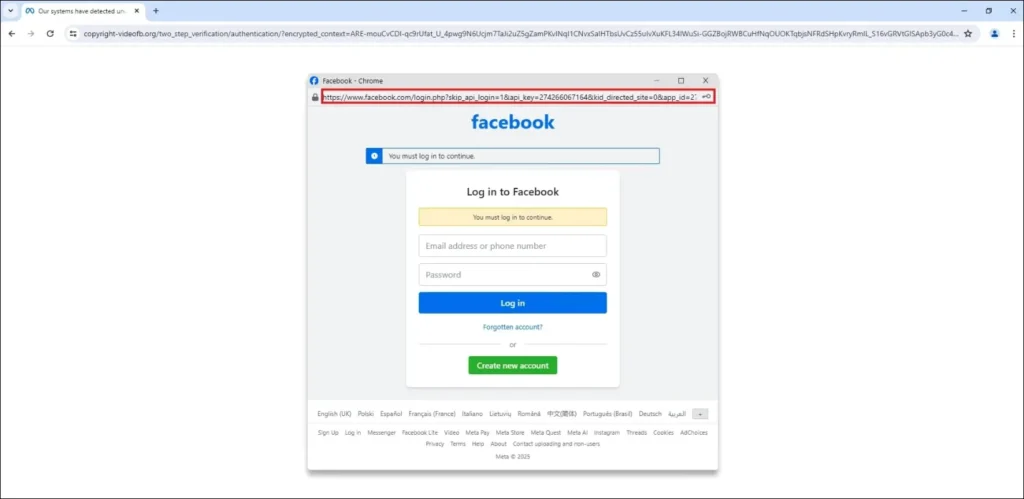
How BitB Phishing Works
- Fake login pop-ups inside real web pages:
Attackers use HTML, CSS, and JavaScript to create a pop-up window inside the victim’s actual browser tab that appears to be a legitimate login prompt (e.g., “Sign in with Google” or other service providers). - Targets popular services:
The technique is being used to target accounts for major services such as Microsoft, Facebook, and Steam gaming platforms. - Visual deception over URL inspection:
The fake window often shows a convincing “URL” and looks like a real login screen — even though the real browser address bar (with the domain) remains unchanged. - CAPTCHA gate to avoid scans:
Victims are often first redirected to a fake CAPTCHA page to avoid automated security scanning, and only solve it to reach the real phishing page. These sites are sometimes hosted on legitimate cloud storage or hosting services. - Credential theft:
When users enter credentials, those details go directly to attackers, not to the genuine service.
Common Lures Used by Attackers
- Fake notifications:
For example, “Account Suspension,” “Action Required,” or “Unauthorized Login” alerts designed to trigger urgency and fear. - Gaming incentives:
Online gamers may be lured by free game items through YouTube ads or other bait. - Document access requests:
Microsoft users may be told they need to log in to view a document.
Why It’s Hard to Spot
The trick relies on exploiting user trust in familiar authentication flows and visual cues rather than using obviously fake URLs or brand logos — this makes credential theft very hard to detect with just a glance.
Attack Kits & Automation
- Phishing-as-a-Service (PhaaS) kits like Sneaky2FA have added BitB capabilities, making it increasingly easy for attackers to deploy these techniques.
- Other services like Raccoon0365 are also incorporating BitB features into their toolsets.
Updated Detection Tips
These are practical ways to tell a BitB phishing attempt from a real login prompt:
1. Password Manager Behavior
If your password manager doesn’t trigger to autofill credentials on a login pop-up that normally would, that’s a major red flag.
2. Window Mobility
Try dragging the login window:
- Real browser windows can be dragged outside and moved independently.
- Fake BitB pop-ups are trapped inside the web page and can’t detach.
3. Browser Controls
If you cannot interact with the URL bar, address/bar icons, or other browser UI elements as expected, that’s suspicious.
Best Defenses
- Enable two-factor authentication (2FA) wherever possible — this significantly limits the value of stolen credentials.
- Use phishing-resistant authentication like passkeys or WebAuthn — these methods can neutralize BitB attacks.
- Stay vigilant and always verify pop-ups using the tips above.
Summary
Browser-in-the-Browser phishing is a visual deception technique that’s growing in sophistication. By mimicking familiar login flows inside a fake embedded browser window, attackers can steal credentials even from careful users. The rise of automated phishing kits with BitB capability and the use of tactics like fake CAPTCHA gating make this threat especially potent.
