

The Android ecosystem has always been known for its flexibility. Unlike many other platforms, it allows users to install applications from sources beyond its official marketplace. While this openness gives users freedom, it also creates a space where cybercriminals can operate more easily. In response to growing security concerns, Google has introduced a new mechanism called Advanced Flow, aimed at making sideloading safer without removing it entirely.
This report explores the technical details behind this new feature, its implications for cybersecurity, and what it means for everyday users. The goal is to present the information in a clear, human-friendly way while maintaining the technical accuracy expected in a professional security analysis.
Understanding Sideloading: A Double-Edged Sword
Sideloading refers to installing applications from outside the official app store, such as the Google Play Store. On Android devices, this usually involves downloading an APK (Android Package Kit) file from a website, email attachment, or third-party platform and installing it manually.
In practice, the process looks something like this:
- A user downloads an APK file from a non-official source
- They enable a system setting that allows installations from unknown or unverified developers
- The app is installed manually on the device
While this process is straightforward, it has long been a weak point in Android security.
Cybercriminals frequently exploit sideloading by tricking users into installing malicious applications. These attacks often rely on social engineering, where attackers create a sense of urgency or fear to manipulate victims. For example, a user might receive a message claiming their bank account is compromised and be instructed to install a “security app” that is actually malware.
According to research from the Global Anti-Scam Alliance (GASA), scams resulted in an estimated $442 billion in losses globally last year. A significant portion of these attacks involved malicious apps installed outside official app stores.
The Problem Google Is Trying to Solve
From a security perspective, sideloading creates a gap in protection. Apps distributed through the Play Store go through multiple layers of verification, including automated scanning and policy checks. However, apps installed via sideloading bypass many of these safeguards.
Attackers take advantage of this in several ways:
- Distributing infostealer malware that extracts sensitive data
- Installing remote access tools to control devices
- Delivering banking trojans that intercept financial information
- Using fake apps to harvest login credentials
The most concerning aspect is not just the malware itself, but how easily users can be pressured into installing it. Many attacks happen in real time, with scammers guiding victims step-by-step over phone calls or messages.
This is where Advanced Flow comes in.
What Is Advanced Flow?
Advanced Flow is a redesigned process for enabling sideloading on Android devices. Instead of allowing users to quickly toggle a setting and install apps, it introduces additional steps, delays, and verification layers.
The idea is simple: slow the user down just enough to break the attacker’s influence.
Rather than removing sideloading entirely, Google has chosen a balanced approach. Users still retain control, but the process becomes more deliberate and resistant to manipulation.
How Advanced Flow Works
To install apps from unverified developers under the new system, users must go through a structured sequence of actions:
1. Enabling Developer Mode
The process begins by activating developer mode in the system settings. While this step is not difficult, it adds a layer of intentionality. It prevents accidental activation and reduces the likelihood of one-click bypasses often used in scam scenarios.
2. Completing a Safety Check
Users are then prompted to complete a short safety verification. This step is designed to ensure that the user is not being coerced or guided by a third party. It acts as a psychological checkpoint, encouraging users to reflect on what they are doing.
3. Restarting the Device
Next, the device must be restarted. This is a critical security measure. It interrupts any ongoing remote sessions or phone calls that scammers might be using to guide the victim. By forcing a reboot, the system effectively cuts off real-time attacker influence.
4. Mandatory Waiting Period
After the restart, users must wait 24 hours before proceeding. This delay is one of the most important components of Advanced Flow. Scammers often rely on urgency to succeed. By introducing a waiting period, the system gives users time to reconsider their actions.
5. Final Confirmation
After the waiting period, users must confirm their decision using biometric authentication (such as fingerprint or facial recognition) or a device PIN. This ensures that the action is deliberate and performed by the device owner.
6. Controlled Access Duration
Once enabled, sideloading permissions can be granted for a limited period (such as seven days) or indefinitely. Even then, the system continues to display warnings when installing apps from unverified sources.
Additional Developer Changes
Alongside Advanced Flow, Google is also introducing limited distribution accounts. These are designed for students, hobbyists, and small-scale developers.
Key features include:
- Distribution to a limited number of devices (up to 20)
- No requirement for identity verification
- No registration fee
This allows developers to share apps for testing or personal use without going through the full Play Store publishing process.
What This Means for Users
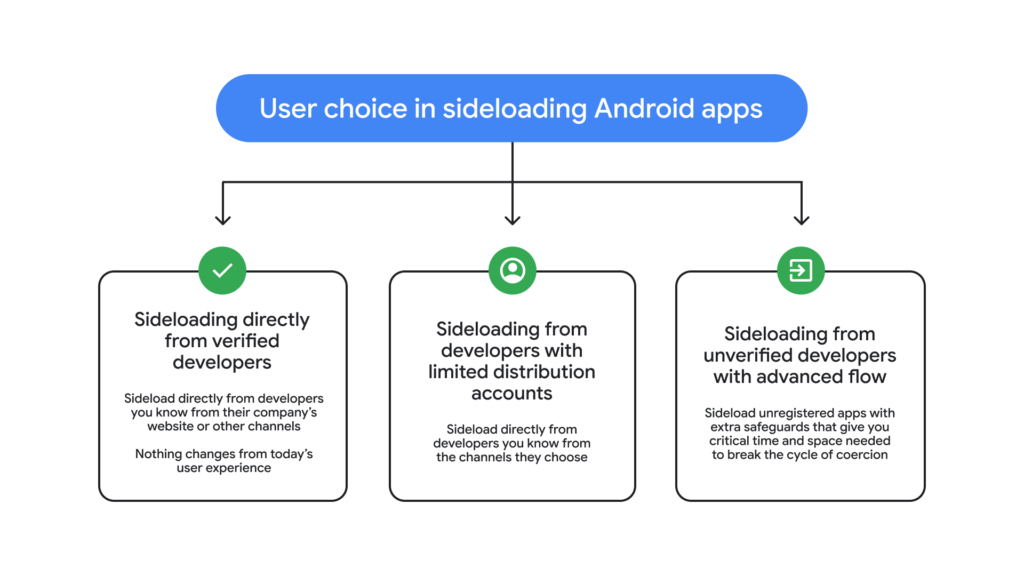
With these updates, Android users will have three main sideloading options:
- Installing apps from verified developers
- Installing apps through limited distribution accounts
- Installing apps from unverified developers using Advanced Flow
This structured approach provides flexibility while introducing meaningful safeguards.
For most users, the changes will make it harder to accidentally install malicious apps. For advanced users, sideloading remains available, albeit with additional steps.
Security Impact Assessment
From a cybersecurity standpoint, Advanced Flow addresses several key attack vectors:
Mitigation of Social Engineering
The added steps and delays disrupt the typical flow of scam attacks. Attackers rely on speed and pressure, both of which are weakened by the new system.
Reduction of Remote Manipulation
The mandatory device restart cuts off active attacker sessions, making it harder for scammers to guide users in real time.
Increased User Awareness
The safety checks and warnings encourage users to think critically before proceeding.
Preservation of User Freedom
Unlike stricter platforms, Android continues to allow sideloading, maintaining its open ecosystem.
Potential Limitations
While Advanced Flow improves security, it is not without drawbacks.
The most noticeable issue is the one-day waiting period, which may frustrate legitimate users who need to install apps quickly. Developers and power users might find the process inconvenient, especially during testing or urgent deployments.
Additionally, determined users can still bypass safeguards if they choose to proceed. This means that while the system reduces risk, it does not eliminate it entirely.
Expected Rollout
Google plans to roll out Advanced Flow starting in August 2026. As with most Android updates, availability may vary depending on device manufacturers and regions.
Our Analysis and Perspective
From our standpoint, Advanced Flow represents a thoughtful and realistic step forward in mobile security. Instead of taking a restrictive approach, Google has chosen to address the root cause of many mobile threats: human behavior under pressure.
Most successful attacks today are not purely technical exploits. They are psychological operations. Attackers manipulate urgency, fear, and trust to convince users to act against their own interests. In this context, the design of Advanced Flow is particularly effective because it targets the timing and emotional state of the user rather than just the technical process.
The introduction of a forced delay is especially noteworthy. In cybersecurity, even a small pause can significantly reduce the success rate of social engineering attacks. By requiring users to wait 24 hours, Google is essentially removing the attacker’s biggest advantage: immediacy. This simple change could prevent a large number of real-world scams.
The restart requirement is another smart addition. Many scam operations depend on continuous communication, where the attacker guides the victim step by step. Breaking that connection disrupts the attack chain and gives the user a chance to reconsider.
However, there is a trade-off. Advanced users and developers may experience friction. The Android ecosystem has always been valued for its openness, and any added barriers can feel restrictive. The challenge for Google is maintaining this balance without alienating its core user base.
In our view, Google has managed this balance reasonably well. Sideloading is still available, and users retain control over their devices. The added steps are not overly complex, but they are enough to deter impulsive or manipulated actions.
Looking ahead, this approach could set a precedent for other platforms. Instead of removing risky features entirely, companies may focus on redesigning workflows to reduce abuse while preserving functionality.
Overall, Advanced Flow is not a complete solution, but it is a meaningful improvement. It acknowledges that security is not just about technology, but also about human decision-making. By addressing both, it strengthens the Android ecosystem in a practical and user-conscious way.
Conclusion
Advanced Flow is a clear example of evolving cybersecurity strategies in response to modern threats. Rather than eliminating sideloading, Google has chosen to make it safer through thoughtful design changes.
By introducing delays, verification steps, and user awareness mechanisms, the company is tackling one of the most exploited weaknesses in mobile security. While not perfect, this approach strikes a balance between usability and protection.
As cyber threats continue to evolve, solutions like Advanced Flow highlight the importance of combining technical safeguards with an understanding of human behavior.
