

Security teams have been monitoring a series of attacks that combine social engineering with remote-access abuse. The attackers rely on a relatively simple but effective strategy. First, they overwhelm a victim with spam emails, then approach the same user pretending to be internal IT support through Microsoft Teams.
During the conversation, the attacker claims that the user’s mailbox activity looks abnormal and offers to help resolve the issue. The victim is then asked to grant remote access through Quick Assist, a legitimate Windows remote assistance tool. Because the tool is built into Windows and often used by support teams, victims are more likely to trust the request.
Once the attacker gains access to the machine, they deploy their own tools to maintain persistence and begin the next stage of the attack. In recent investigations, researchers discovered a previously undocumented backdoor component has been named A0Backdoor.
The malware includes several evasion techniques such as sandbox detection, debugging disruption, and encrypted payload delivery. The attackers also appear to have changed their command-and-control strategy. Instead of making direct outbound connections, the malware communicates through a covert DNS-based channel that relies on MX (mail exchange) records. This allows infected hosts to communicate with attacker infrastructure while only contacting trusted DNS resolvers.
Based on the tactics and operational patterns observed, this activity strongly resembles operations attributed to the threat group Blitz Brigantine, also known as Storm-1811 or STAC5777. This group has previously been associated with ransomware operations linked to the Black Basta ecosystem. The campaign described in this report suggests the group is continuing to refine its tooling to better evade modern detection controls.
Initial Attack Method
The attack begins with what is often referred to as an email bombing attack. The targeted employee suddenly receives a large number of spam messages within a short period of time. This creates confusion and makes it appear as though something is wrong with the user’s mailbox.
Shortly afterward, the attacker reaches out to the same individual through Microsoft Teams, pretending to be part of the organization’s IT support staff. They mention that they have noticed unusual activity in the user’s email account and offer assistance.
At this point, the attacker asks the user to launch Quick Assist so they can remotely diagnose the issue. If the victim agrees, the attacker gains full remote access to the system.
From there, the attacker begins deploying additional software designed to maintain access and prepare the environment for further malicious activity.
Delivery of Malicious Software
During investigations into two separate incidents, analysts observed that the attackers delivered their tools through MSI installer packages that were digitally signed. These installers were hosted on Microsoft cloud infrastructure tied to personal accounts.
One domain frequently used in these attacks was: my[.]microsoftpersonalcontent[.]com
The download links were tokenized, which means the files could only be retrieved through specific URLs. This makes later analysis more difficult because the links expire or become inaccessible.
Researchers also noticed that the installer packages and associated binaries were signed with several different certificates dating back to mid-2025. This suggests the attackers have been developing and reusing their tooling for quite some time.
To avoid suspicion, the installers were designed to look like legitimate Microsoft components. In particular, they imitated software related to:
- Microsoft Teams
- CrossDeviceService features
The files were placed into directories that resemble legitimate Microsoft application folders, such as:
C:\Users\<User>\AppData\Local\Microsoft\CrossDevice Share\25017.203.3370
C:\Users\<User>\AppData\Local\Microsoft\TeamsPhoneAddins\3.1.1.15\
Because these directories normally contain Microsoft software, the malicious files are less likely to attract attention.
Analysis of the MSI Installer
One of the installer files analyzed during the investigation was Update.msi.
SHA256: 0c99481dcacda99014e1eeef2e12de3db44b5db9879ce33204d3c65469e969ff
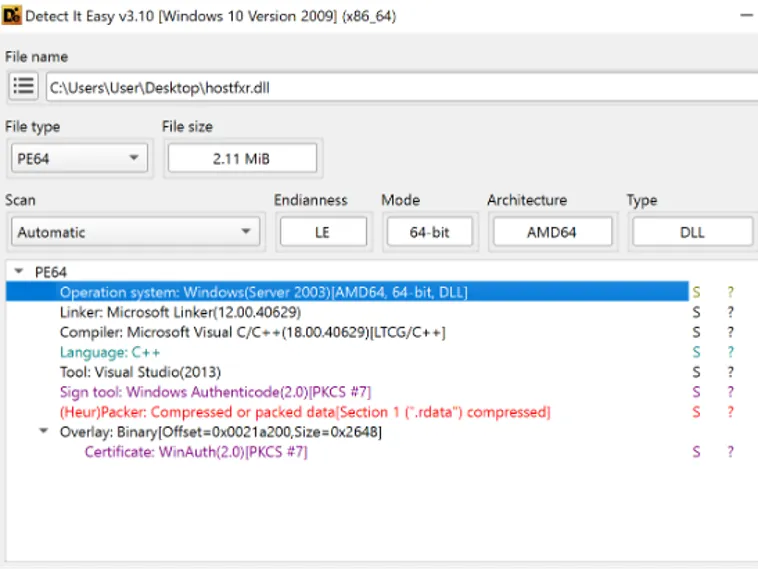
Inside the installer package were several dynamic link libraries (DLLs). Most of these appeared legitimate and were signed by Microsoft. However, one file stood out: hostfxr.dll.
Normally, this file is a legitimate Microsoft .NET component. In this case, it had been replaced with a malicious version that was signed using a certificate belonging to: MULTIMEDIOS CORDILLERANOS SRL
This malicious DLL served as the loader responsible for starting the malware chain.
Behavior of the Loader
Initial analysis of the modified hostfxr.dll revealed that it contained encrypted data stored within its .data section. The code also included numerous calls to meaningless functions. These calls do not serve a real purpose during execution but are intended to slow down analysts and debugging tools.
Another unusual behavior was the heavy use of the Windows API function CreateThread(). The loader repeatedly creates new threads during execution. Under normal conditions this has little impact on the program’s behavior. However, when a debugger is attached, the large number of threads can overwhelm the analysis environment and occasionally cause debugging tools to crash.
The main goal of the loader is fairly typical for malware loaders. It decrypts a hidden payload stored within the DLL and then executes it in memory.
To do this, the loader allocates a new block of memory, marks it as executable, decrypts the embedded data, and then transfers execution to that region.
Payload Decryption Process
The encrypted payload is decrypted using a custom routine. The first byte of the encrypted buffer is used as a seed value. The remaining bytes are processed using a repeating key derived from the ASCII string: crossdeviceservice.exe
For every byte in the buffer, the routine subtracts a calculated value that includes the seed, the loop index, and the corresponding byte from the repeating key.
After the entire buffer is processed, the decrypted result is executed. The output of this routine resembles shellcode, which is a small piece of executable code typically used to load additional payloads.
Shellcode Operations
Once the shellcode begins running, it immediately decrypts additional embedded data. This approach prevents important strings and logic from appearing in the binary until runtime, which makes static analysis more difficult.
One of the first actions performed by the shellcode is creating a mutex to ensure that only one instance of the malware runs at a time.
The mutex name is built by combining the string: globalscope0
with the executable name returned by the Windows API GetModuleFileNameW.
If the mutex already exists, the shellcode simply terminates.
Time-Based Execution Control
The malware also uses time-based logic to influence its behavior. It retrieves the current system time using the Windows API GetSystemTimeAsFileTime.
The value is then converted to Unix time and processed through a calculation that divides time into roughly 55-hour intervals. The result is a small numerical value referred to as a “slot”.
This slot value becomes part of the key used during later decryption steps.
If the malware runs outside the intended time window, the calculated key changes and the encrypted payload cannot be properly decrypted. This technique is sometimes referred to as environmental keying.
Command-Line Trick
Another interesting detail discovered during analysis involves the process command line.
The command line used to launch the process ends with two normal spaces followed by a non-breaking space character (U+00A0). Visually, this character looks identical to a regular space, but it has a different underlying value.
The malware extracts this hidden character and includes it when building the encryption key used later in the attack chain.
Virtual Machine Detection
Before continuing, the shellcode attempts to determine whether it is running in a virtualized or sandboxed environment.
It retrieves firmware information using the Windows API GetSystemFirmwareTable and searches for indicators such as the string “QEMU”, which is commonly associated with virtual machines used in analysis environments.
If virtualization is detected, the malware intentionally modifies its encryption key so that the next stage of the payload fails to decrypt.
AES Payload Decryption
After generating the necessary key material, the malware uses Windows cryptographic functions to produce a SHA-256 hash. This hash is then used as the key for decrypting an AES-encrypted payload.
The encrypted data is copied into a new memory region and decrypted using the Windows API CryptDecrypt. After decryption completes, execution is redirected to the entry point of the final payload.
This payload is the A0Backdoor.
A0Backdoor Behavior
The A0Backdoor component continues the pattern of hiding its internal logic through runtime decryption. When it starts running, the malware allocates a new memory region and copies its own code there.
Although this self-copying behavior does not directly add new functionality, it helps obscure the malware’s execution flow.
The backdoor then decrypts its core routines using a built-in XOR key and begins collecting information about the infected machine. This includes details such as the username, computer name, and other system identifiers obtained through Windows API calls.
This data allows the attacker to uniquely identify each compromised device.
DNS-Based Command and Control
Rather than establishing a direct network connection to attacker servers, the malware communicates through DNS queries.
The infected system sends DNS requests to public recursive resolvers such as:
1.1.1.1
8.8.8.8
Those resolvers then query attacker-controlled authoritative name servers on behalf of the infected machine.
The malware uses MX record queries, embedding encoded data within subdomain labels. The attacker’s server responds with MX records that contain additional encoded information within the hostname field.
The malware extracts this data and interprets it as commands or configuration information.
Because the endpoint only communicates with legitimate DNS services, the traffic often appears harmless.
Domain Infrastructure
Another interesting observation is the attackers’ domain strategy.
Instead of generating obviously suspicious domains, they often acquire previously registered domains that have expired. After regaining control of the domain, they update the name server configuration so they can host their own authoritative DNS service.
This method helps the domains appear less suspicious compared to newly registered or randomly generated domains.
Attribution
Based on the tactics, infrastructure, and delivery methods, analysts believe the campaign is strongly linked to the threat group Blitz Brigantine.
Several elements support this assessment:
- the same email bombing technique
- impersonation of IT staff through Microsoft Teams
- abuse of Quick Assist for remote access
- similar malware delivery workflows
These methods have previously been associated with ransomware operations connected to Black Basta and Cactus affiliates.
Targeted Organizations
The incidents investigated involved organizations within:
- the financial sector
- healthcare-related industries
These sectors are likely selected because of the potential financial impact of disruption and the large number of employees who rely on collaboration platforms like Microsoft Teams.
Indicators of Compromise
File Hashes
Update.msi
0c99481dcacda99014e1eeef2e12de3db44b5db9879ce33204d3c65469e969ffhostfxr.dll
26db06a2319c09918225e59c404448d92fe31262834d70090e941093e6bb650a
Domains
fsdgh[.]com
my[.]microsoftpersonalcontent[.]com
Overall, this campaign appears to be an evolution of previously documented attacks linked to the Blitz Brigantine ecosystem. The initial access method remains largely the same—email flooding followed by impersonation of IT staff through Microsoft Teams.
What has changed is the technical sophistication of the malware. The attackers have introduced new payloads such as A0Backdoor, improved their use of signed installers, and moved toward a stealthier DNS-based command-and-control system.
These changes suggest that the operators are actively refining their techniques to bypass modern detection mechanisms and blend their activity into normal enterprise network traffic.
Organizations should therefore focus not only on technical detection but also on user awareness, particularly around unexpected remote-support requests and unusual Microsoft Teams messages.
