

As artificial intelligence makes online scams faster, cheaper, and more convincing, phishing attacks are becoming harder for everyday users to spot. Fake websites can now look almost identical to the real thing, down to logos, layouts, and language. Recognizing this growing threat, 1Password has introduced a new built-in protection feature designed to warn users when they may be about to hand over credentials to a phishing site.
This update adds an extra layer of defense at exactly the moment users are most vulnerable: when they are about to enter their login details.
Why Phishing Is Getting More Dangerous
Phishing scams are no longer limited to poorly written emails or obviously suspicious websites. With AI tools, attackers can quickly generate polished messages and realistic websites that closely mimic trusted brands. These scams often rely on urgency—asking users to “verify” accounts, reset passwords, or respond to security alerts—pushing people to act before they fully check the details.
Even careful users can slip up, especially when manually copying and pasting passwords. Once credentials are entered on a fake site, attackers can immediately use them to take over accounts, steal data, or launch further attacks.
How 1Password’s New Protection Works
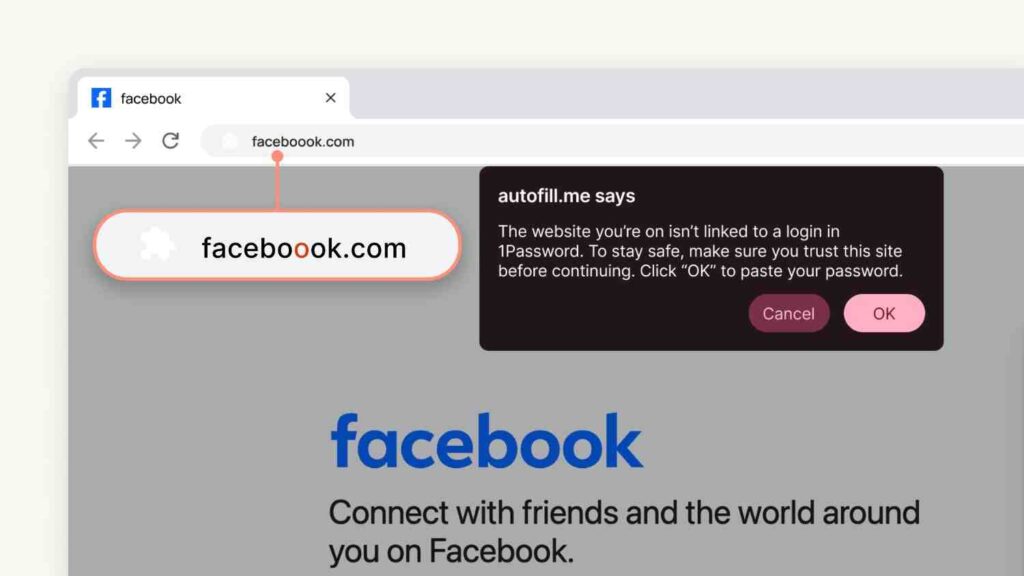
1Password has long refused to autofill login details on websites that don’t exactly match the saved URL. However, users could still manually paste their username or password into a suspicious site. The new feature is designed to close that gap.
Now, if you try to paste saved credentials into a website that doesn’t match the one associated with your login, the 1Password browser extension will display a clear pop-up warning. This alert encourages you to pause and double-check the site before continuing. The idea isn’t to block users outright, but to provide a moment of friction that can prevent costly mistakes.
A “Second Pair of Eyes” at the Right Time
What makes this update effective is its timing. The warning appears precisely when a user is about to paste sensitive information, not earlier or later when it might be ignored. That short interruption can be enough to notice a misspelled domain, an unusual URL, or a site that doesn’t feel quite right.
In many cases, phishing succeeds not because users are careless, but because they’re distracted or rushed. This feature acts as a calm reminder to slow down.
Default Protection for Most Users
The phishing warning feature is enabled by default for individual and family plan users, meaning no setup is required. Business customers can also use it, with administrators able to manage the setting through the admin console. This ensures organizations can apply consistent protection across teams while still maintaining flexibility.
A Small Change With Big Impact
As AI continues to supercharge phishing scams, traditional security habits are no longer enough on their own. By adding contextual, real-time warnings, 1Password strengthens its role as more than just a password manager—it becomes an active participant in helping users make safer decisions online.
The result is a simple but powerful upgrade: fewer stolen credentials, fewer compromised accounts, and a safer everyday browsing experience.
