

Cybersecurity researchers recently uncovered a concerning malware campaign that started around late February 2026. What makes this attack especially dangerous is how it spreads—through something people use every day: WhatsApp.
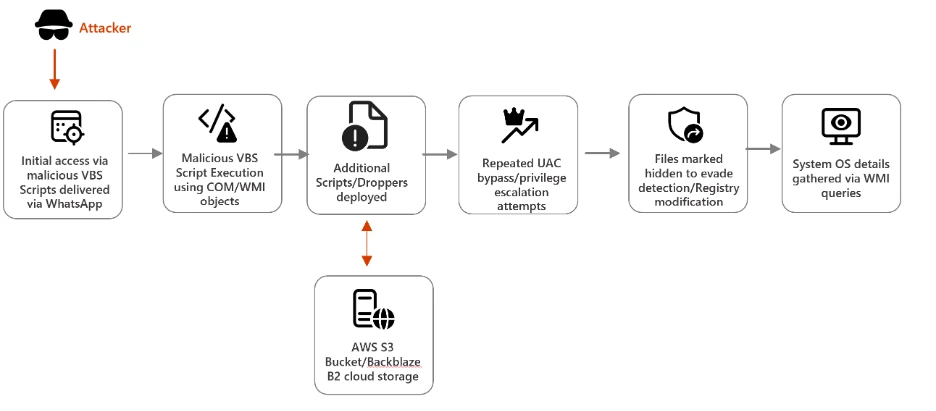
Instead of complex hacking techniques at the entry point, attackers are relying on simple human trust. Victims receive messages containing seemingly harmless files, but these are actually malicious Visual Basic Script (VBS) files. Once opened, the system begins a silent but carefully designed infection process that unfolds in multiple stages.
The attack doesn’t rush. It moves step by step, making it harder for both users and security tools to notice anything unusual.
How the Infection Begins
The moment a user executes the VBS file, the script quietly creates hidden directories inside the system, typically under C:\ProgramData. This is a common location used by legitimate software, which helps the malware stay unnoticed.
Next, the script copies real Windows tools like curl.exe and bitsadmin.exe but renames them to misleading names such as netapi.dll and sc.exe. These are not fake tools—they are genuine system utilities, just disguised.
Interestingly, even though the file names are changed, their internal metadata still reveals their original identity. This creates a mismatch that advanced security tools can detect. However, in environments where such checks are not active, the activity can easily slip through.
These renamed tools are then used to download additional malicious files from the internet.
Using Trusted Cloud Services to Hide in Plain Sight
In the second phase, the malware pulls more scripts from cloud platforms like AWS, Tencent Cloud, and Backblaze B2. These platforms are widely used by businesses, so traffic going to them usually doesn’t raise alarms.
By hosting malicious files on trusted infrastructure, attackers blend their activity with normal network traffic. This makes it extremely difficult for defenders to separate legitimate use from malicious behavior.
The downloaded files continue the infection process, expanding control over the system.
Gaining Control and Staying Persistent
Once the malware has a foothold, it shifts its focus to gaining deeper access. It starts interfering with User Account Control (UAC), a security feature designed to prevent unauthorized changes.
The malware repeatedly attempts to launch command-line processes with elevated privileges. At the same time, it modifies system registry settings to weaken security prompts. Eventually, it reduces or completely suppresses UAC alerts, allowing administrative actions without user approval.
To ensure it isn’t removed easily, the malware also establishes persistence. This means it can survive system restarts and continue operating in the background.
Final Stage: Remote Access Through Fake Installers
In the last phase, the attackers deploy malicious MSI installer packages. These files often mimic legitimate software like system updates or tools such as remote access applications.
What stands out is that these installers are unsigned. Normally, trusted software includes a verified digital signature, so the absence of one is a major warning sign.
Once installed, these tools allow attackers to remotely access the infected system. From there, they can steal data, install additional malware, or even use the device as part of a larger attack network.
How Organizations Can Protect Themselves
To reduce the risk of such attacks, organizations need to strengthen multiple layers of security.
Blocking or restricting script execution in untrusted locations is a strong first step. Monitoring unusual behavior, such as renamed system tools or suspicious command-line activity, can also help detect threats early.
Network monitoring is equally important. Even traffic to trusted cloud services should be inspected carefully to identify hidden malicious downloads.
Security teams should also keep a close eye on registry changes, especially those related to UAC settings. Repeated modifications can indicate an ongoing compromise.
Equally important is user awareness. Employees should be trained to treat unexpected attachments—even from familiar platforms like WhatsApp—with caution.
Advanced protections such as endpoint detection and response (EDR), tamper protection, and automated remediation systems can significantly reduce the impact of such attacks.
Our Take on This Campaign
What stands out in this campaign is not just the technical execution, but the strategy behind it. The attackers are not relying on zero-day vulnerabilities or highly advanced exploits. Instead, they are combining simple techniques in a smart way—social engineering, legitimate tools, and trusted cloud services.
This reflects a growing trend in cybercrime where attackers focus on blending in rather than breaking in. By using tools already present in the system and infrastructure that organizations trust, they reduce the chances of being detected.
It also highlights a gap in many security setups. While companies invest heavily in antivirus and firewalls, they often overlook behavioral monitoring and user education. This campaign succeeds because it targets both technology and human behavior at the same time.
In our view, the biggest lesson here is that security is no longer just about blocking threats—it’s about understanding how normal activity can be misused. Organizations that fail to adapt to this mindset will continue to face similar attacks.
The future of cybersecurity will depend less on signatures and more on context, patterns, and awareness.
